> ## Documentation Index
> Fetch the complete documentation index at: https://docs.dodopayments.com/llms.txt
> Use this file to discover all available pages before exploring further.
# 客户阻止列表
> 阻止某位客户,以阻止其未来再次结账、取消其有效订阅,并将其 Customer Portal 设为只读。可从 Settings 或 API 管理阻止列表。
Customer Blocklist 可阻止已知的不良行为者再次向您购买商品。被阻止的客户无法付款,会失去其有效订阅,并可以在 [Customer Portal](/features/customer-portal) 中查看账户,但无法更改订阅。您可以从 **Settings → Blocklist** 或通过 Blocklist API 管理阻止名单。
 ## 阻止客户后会发生什么
添加阻止后,阻止会立即在以下各个区域生效:
| 区域 | 影响 |
| - | - |
| **Checkout** | 来自被阻止邮箱的所有付款尝试都会被拒绝:包括 payment links、checkout sessions,以及通过 API 创建的付款或订阅。 |
| **Live subscriptions** | 处于 `pending`、`active`、`on_hold` 或 `paused` 状态的订阅会以原因 `cancelled_by_merchant` 取消。每个订阅都会触发通常的 `subscription.cancelled` webhook。 |
| **Renewals and retries** | 自动续订和 [payment retries](/features/recovery/payment-retries) 会跳过被阻止的客户,因此不会产生后续扣款,即使取消仍在等待处理。 |
| **Manual retry** | 对被阻止客户的付款执行 [manual retry](/features/recovery/manual-retry) 会被拒绝。 |
| **Customer Portal** | 客户仍可登录并查看发票、订阅和 license keys。但无法取消、暂停或恢复订阅、更改方案、更新 payment method,或编辑发票地址。他们仍可移除已保存的 payment method。 |
阻止不会退还过去的付款,也不会影响未结争议。如需退款,请从 [Refunds](/features/transactions/refunds) 页面单独发起。
## 阻止如何匹配客户
您可以按 **customer ID** 或 **email** 进行阻止。无论使用哪种方式,阻止都是基于客户的 email,而不是客户记录:
* **该 email 对应的每条记录都会受到影响。** Checkout 可以为回访客户的 email 创建新的客户记录,因此仅阻止单个 customer ID 可能会被绕过,而按 email 阻止则不会。
* **别名也会受到影响。** 系统会将 email 转为小写,并移除其中的 `+alias`,因此 `buyer+promo@example.com` 和 `Buyer@example.com` 会被视为同一客户。地址中的点号会保持不变。
* **仅限您的业务。** 阻止仅适用于您的业务。同一 email 仍可在 Dodo Payments 上向其他业务购买商品。
* **email 必须属于现有客户。** 如果 email 与您的任何客户都不匹配,您无法阻止该 email;如果客户记录没有 email,也无法阻止该客户记录。
## 阻止客户
您可以从 Blocklist 页面或客户自己的页面阻止客户。
在 dashboard 中前往 **Settings → Blocklist**。
点击 **Add to Blocklist**,然后在 **Customer ID or email** 中输入客户的 email 或 customer ID。面板会显示匹配的客户。
在面板中点击 **Add to Blocklist**。客户的有效订阅会立即取消,该条目会显示在 **Blocked entries** 表格中。如果部分订阅仍在取消,dashboard 会显示提示。稍后刷新页面进行检查。
前往 **Sales → Customers**,打开您要阻止的客户。
打开三点图标菜单,然后选择 **Block this Customer**。
点击 **Block**。阻止生效后,页面会在客户姓名旁显示 **Blocked** 徽章。
dashboard 不会要求填写原因。要记录阻止客户的原因,请在客户页面添加备注,或通过 API 执行阻止时发送 `reason`。
## 管理被阻止的客户
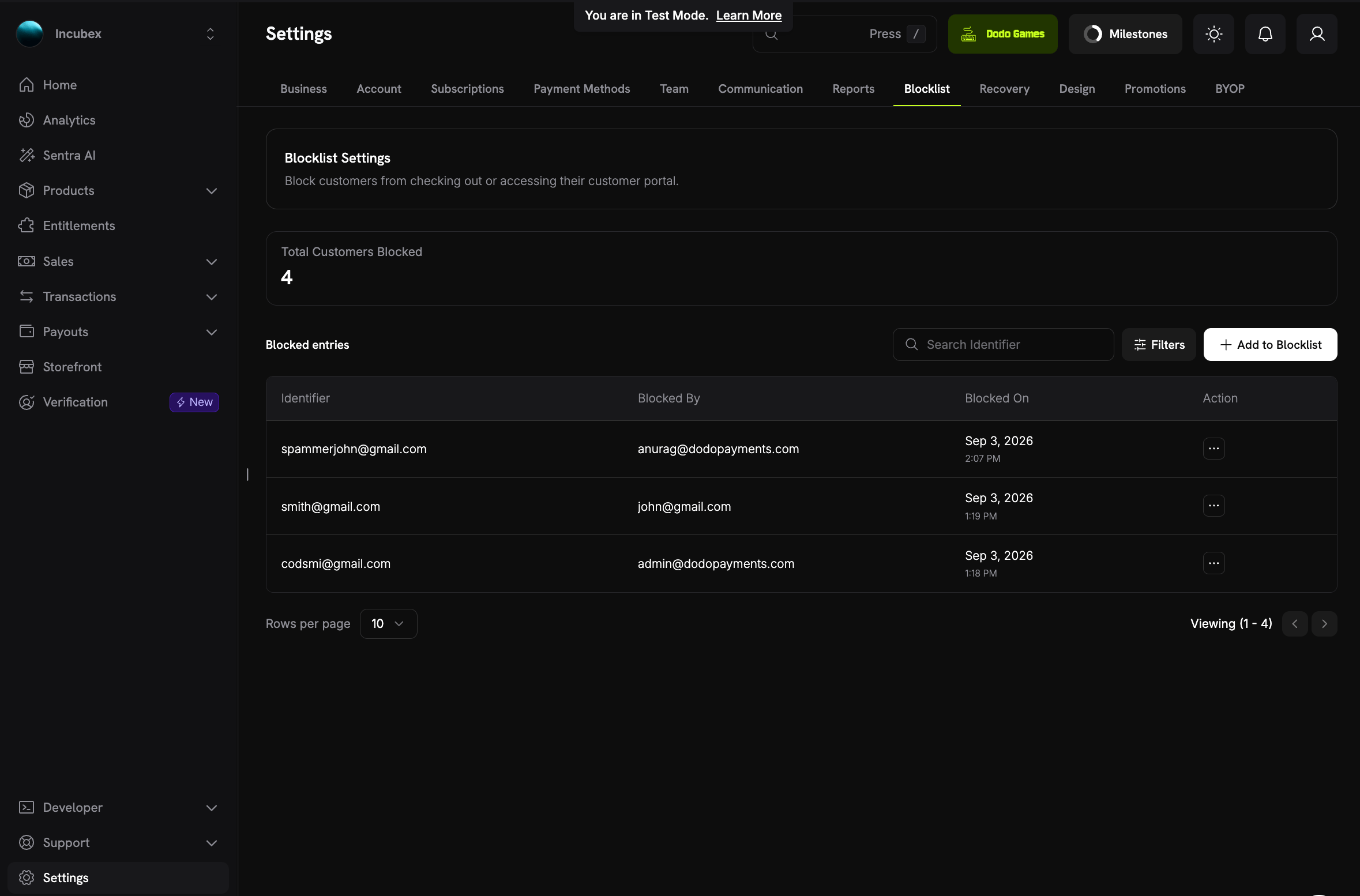
**Blocklist** 页面会列出所有有效的阻止:
* **Total Customers Blocked**:当前被阻止的客户数量。
* **Blocked entries**:每个阻止对应一行,其中包含您输入的 **Identifier**(email 或 customer ID)、**Blocked By** 和 **Blocked On**。**Blocked By** 显示添加阻止的团队成员;如果通过 API key 添加,则显示 **API**。
* **Search Identifier** 和 **Filters**:按 email 或 customer ID 查找条目,或按 **Blocked By** 和 **Blocked Between** 筛选。
* **Action**:**See Details** 打开被阻止客户的页面,**Unblock** 移除阻止。具有 **Viewer** 角色的团队成员无法解除阻止。
### 被阻止客户的页面
## 阻止客户后会发生什么
添加阻止后,阻止会立即在以下各个区域生效:
| 区域 | 影响 |
| - | - |
| **Checkout** | 来自被阻止邮箱的所有付款尝试都会被拒绝:包括 payment links、checkout sessions,以及通过 API 创建的付款或订阅。 |
| **Live subscriptions** | 处于 `pending`、`active`、`on_hold` 或 `paused` 状态的订阅会以原因 `cancelled_by_merchant` 取消。每个订阅都会触发通常的 `subscription.cancelled` webhook。 |
| **Renewals and retries** | 自动续订和 [payment retries](/features/recovery/payment-retries) 会跳过被阻止的客户,因此不会产生后续扣款,即使取消仍在等待处理。 |
| **Manual retry** | 对被阻止客户的付款执行 [manual retry](/features/recovery/manual-retry) 会被拒绝。 |
| **Customer Portal** | 客户仍可登录并查看发票、订阅和 license keys。但无法取消、暂停或恢复订阅、更改方案、更新 payment method,或编辑发票地址。他们仍可移除已保存的 payment method。 |
阻止不会退还过去的付款,也不会影响未结争议。如需退款,请从 [Refunds](/features/transactions/refunds) 页面单独发起。
## 阻止如何匹配客户
您可以按 **customer ID** 或 **email** 进行阻止。无论使用哪种方式,阻止都是基于客户的 email,而不是客户记录:
* **该 email 对应的每条记录都会受到影响。** Checkout 可以为回访客户的 email 创建新的客户记录,因此仅阻止单个 customer ID 可能会被绕过,而按 email 阻止则不会。
* **别名也会受到影响。** 系统会将 email 转为小写,并移除其中的 `+alias`,因此 `buyer+promo@example.com` 和 `Buyer@example.com` 会被视为同一客户。地址中的点号会保持不变。
* **仅限您的业务。** 阻止仅适用于您的业务。同一 email 仍可在 Dodo Payments 上向其他业务购买商品。
* **email 必须属于现有客户。** 如果 email 与您的任何客户都不匹配,您无法阻止该 email;如果客户记录没有 email,也无法阻止该客户记录。
## 阻止客户
您可以从 Blocklist 页面或客户自己的页面阻止客户。
在 dashboard 中前往 **Settings → Blocklist**。
点击 **Add to Blocklist**,然后在 **Customer ID or email** 中输入客户的 email 或 customer ID。面板会显示匹配的客户。
在面板中点击 **Add to Blocklist**。客户的有效订阅会立即取消,该条目会显示在 **Blocked entries** 表格中。如果部分订阅仍在取消,dashboard 会显示提示。稍后刷新页面进行检查。
前往 **Sales → Customers**,打开您要阻止的客户。
打开三点图标菜单,然后选择 **Block this Customer**。
点击 **Block**。阻止生效后,页面会在客户姓名旁显示 **Blocked** 徽章。
dashboard 不会要求填写原因。要记录阻止客户的原因,请在客户页面添加备注,或通过 API 执行阻止时发送 `reason`。
## 管理被阻止的客户
**Blocklist** 页面会列出所有有效的阻止:
* **Total Customers Blocked**:当前被阻止的客户数量。
* **Blocked entries**:每个阻止对应一行,其中包含您输入的 **Identifier**(email 或 customer ID)、**Blocked By** 和 **Blocked On**。**Blocked By** 显示添加阻止的团队成员;如果通过 API key 添加,则显示 **API**。
* **Search Identifier** 和 **Filters**:按 email 或 customer ID 查找条目,或按 **Blocked By** 和 **Blocked Between** 筛选。
* **Action**:**See Details** 打开被阻止客户的页面,**Unblock** 移除阻止。具有 **Viewer** 角色的团队成员无法解除阻止。
### 被阻止客户的页面
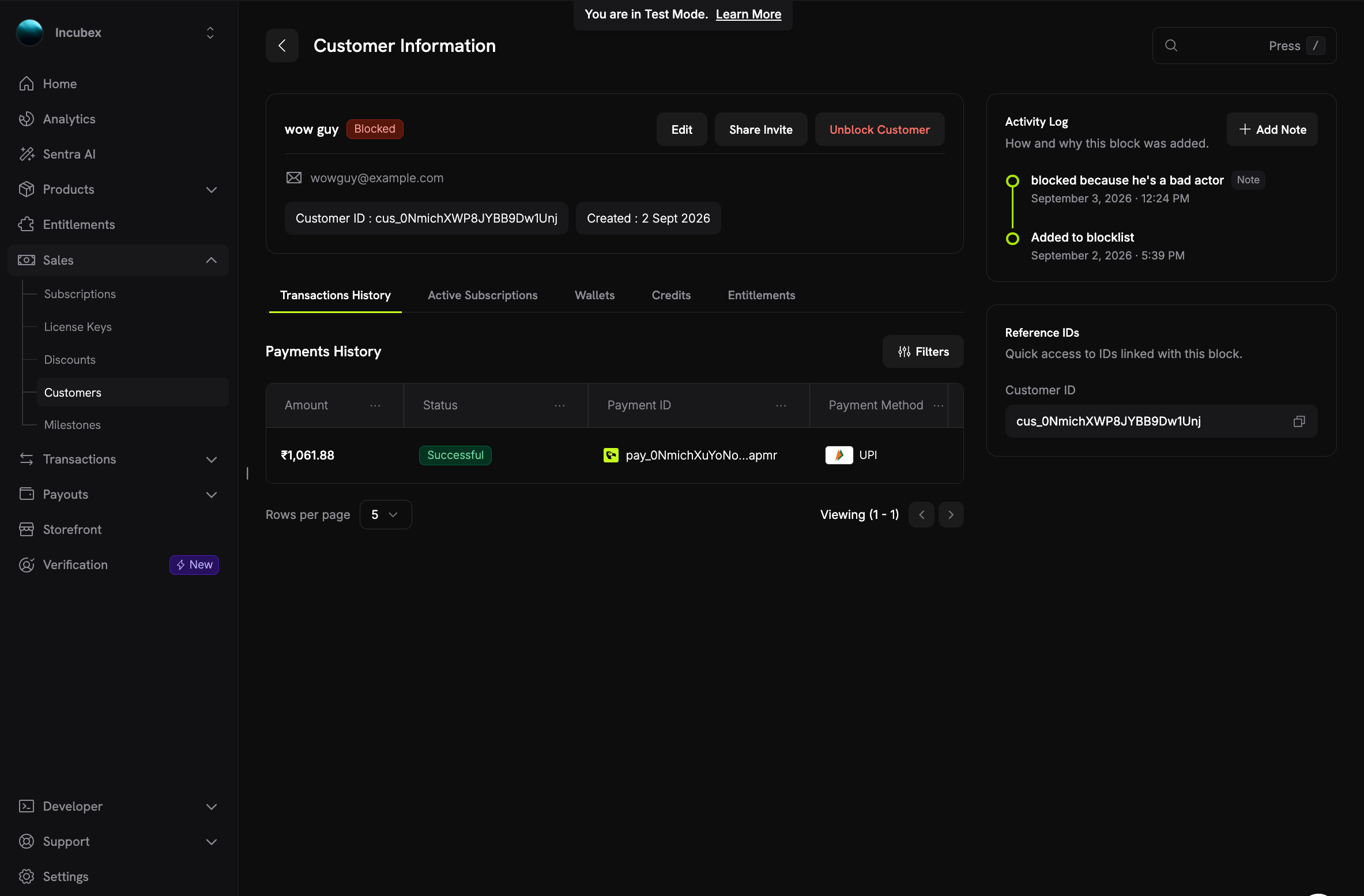 从 **Sales → Customers** 或 Blocklist 页面打开被阻止的客户,即可查看:
* 客户姓名旁的 **Blocked** 徽章,以及 **Unblock Customer** 按钮。
* **Activity Log**:客户被添加到阻止名单的时间、原因,以及团队之后添加的任何备注。点击 **Add Note** 记录新的上下文,例如拒付的处理结果。之后可以通过 API 编辑备注。
* **Reference IDs**:与此阻止关联的 customer ID,可直接复制。
## 解除阻止客户
要解除对客户的阻止,请在客户页面点击 **Unblock Customer**,或在 Blocklist 页面 **Action** 列中选择 **Unblock**。然后点击 **Unblock** 确认。
* Checkout 和 Customer Portal 的更改会立即恢复。
* **已取消的订阅不会重新激活。** 客户必须重新购买。
* 该条目会与备注一起保留为审计记录,但不再显示在有效列表中。
* 之后可以再次阻止同一客户。这会创建一个新条目。
## 客户看到的内容
被阻止的客户不会被告知自己已被阻止。
* **在 checkout 中**,付款会以通用拒付信息失败:"This payment cannot be processed." API 会返回包含错误代码 `PAYMENT_NOT_PERMITTED` 的 HTTP `403`,其中不会说明原因。实际原因仅会写入 Dodo Payments 的日志。
* **在 Customer Portal 中**,所有内容仍可见,但所有会更改账户的操作都会被拒绝。被拒绝的操作会返回带有 `PORTAL_ACTION_NOT_PERMITTED` 和消息 "This action is not available." 的 HTTP `403`。portal profile 会携带 `read_only: true`,因此自定义 portal 集成可以禁用自身控件。portal 永远不会暴露阻止名单条目或其备注。
如果您在自己的产品中渲染 checkout 或 portal 错误,请保持此行为。对于 `PAYMENT_NOT_PERMITTED` 和 `PORTAL_ACTION_NOT_PERMITTED`,显示通用消息。透露阻止信息会提示不良行为者尝试其他 email。
## 使用 API
Blocklist API 允许您从自己的工具中执行阻止,例如在收到拒付时。它需要您的 secret [API key](/api-reference/introduction)。任何 key 都可以列出条目并读取备注。启用 **write access** 的 key 可以阻止、解除阻止和管理备注。dashboard 对团队角色采用相同的权限划分:**Viewer** 角色可以读取列表,**Editor** 角色可以进行更改。
Blocklist API 有六个 endpoints:
| Method | Endpoint | Purpose |
| - | - | - |
| `GET` | `/blocklist/customers` | 列出被阻止的客户,并支持筛选和 `total` count |
| `POST` | `/blocklist/customers` | 按 customer ID 或 email 阻止客户 |
| `GET` | `/blocklist/customers/{entry_id}` | 获取条目及其备注 |
| `DELETE` | `/blocklist/customers/{entry_id}` | 解除对客户的阻止 |
| `POST` | `/blocklist/customers/{entry_id}/notes` | 添加备注 |
| `PATCH` | `/blocklist/customers/{entry_id}/notes/{note_id}` | 更新备注 |
列表仅返回有效的阻止。要筛选列表,请传入 `identifier`(对 email 或 customer ID 进行部分且不区分大小写的匹配)、`blocked_by_email`、`created_at_gte` 或 `created_at_lte`。默认每页返回 10 个条目:设置 `page_size` 可返回最多 100 个条目,设置 `page_number` 可翻页。
### 阻止客户
在请求 body 的顶层发送 `customer_id` 或 `email`。如果同时发送两者,阻止会使用 `customer_id`。`reason` 为可选项,并会显示在条目页面上。新建阻止会返回 HTTP `201`。
```typescript Node.js expandable theme={null}
import DodoPayments from 'dodopayments';
const client = new DodoPayments({
bearerToken: process.env.DODO_PAYMENTS_API_KEY,
});
// Block by customer ID
const entry = await client.blocklist.customers.create({
customer_id: 'cus_0NmichXWP8JYBB9Dw1Unj',
reason: 'Chargeback on pay_0NmichXuYoNoapmr',
});
// Or block by email
const byEmail = await client.blocklist.customers.create({
email: 'buyer@example.com',
reason: 'Repeated refund abuse',
});
console.log(entry.id, entry.cancelled_subscription_ids);
```
```python Python expandable theme={null}
import os
from dodopayments import DodoPayments
client = DodoPayments(bearer_token=os.environ["DODO_PAYMENTS_API_KEY"])
# Block by customer ID
entry = client.blocklist.customers.create(
customer_id="cus_0NmichXWP8JYBB9Dw1Unj",
reason="Chargeback on pay_0NmichXuYoNoapmr",
)
# Or block by email
by_email = client.blocklist.customers.create(
email="buyer@example.com",
reason="Repeated refund abuse",
)
print(entry.id, entry.cancelled_subscription_ids)
```
```bash cURL theme={null}
curl -X POST https://live.dodopayments.com/blocklist/customers \
-H "Authorization: Bearer $DODO_PAYMENTS_API_KEY" \
-H "Content-Type: application/json" \
-d '{
"customer_id": "cus_0NmichXWP8JYBB9Dw1Unj",
"reason": "Chargeback on pay_0NmichXuYoNoapmr"
}'
```
响应会描述该条目以及此调用取消的订阅:
```json Response theme={null}
{
"id": "bcu_7Hq2mV9kRt4LxYw3Pz",
"customer_id": "cus_0NmichXWP8JYBB9Dw1Unj",
"customer_name": "wow guy",
"customer_email": "wowguy@example.com",
"identifier": "cus_0NmichXWP8JYBB9Dw1Unj",
"reason": "Chargeback on pay_0NmichXuYoNoapmr",
"source": "api",
"blocked_by_email": null,
"created_at": "2026-09-02T12:09:41Z",
"unblocked_at": null,
"cancelled_subscription_ids": ["sub_3Fk8pW2nQs6MzXc1"],
"subscriptions_swept": true
}
```
以下字段需要重点关注:
| Field | Description |
| - | - |
| `identifier` | 您发送的 customer ID 或 email。 |
| `source` | 阻止的来源:`blocklist_page`、`customer_page`、`payment_page`、`dispute_page` 或 `api`。API key 始终记录 `api`,无论您发送的 `source` 是什么。 |
| `blocked_by_email` | 添加阻止的 dashboard 用户。对于 API key,则为 `null`。 |
| `cancelled_subscription_ids` | 此调用取消的订阅。仅存在于创建响应中。 |
| `remaining_subscription_ids` | 仍处于有效状态的订阅,因为取消失败,或该调用已达到 25 次取消的上限。 |
| `subscriptions_swept` | 当仍有有效订阅,或 Dodo Payments 无法列出这些订阅时为 `false`。重复调用,直到其变为 `true`。阻止本身已经生效。 |
阻止已被阻止的客户会返回带有 `CUSTOMER_ALREADY_BLOCKED` 的 HTTP `409`,除非仍有订阅等待取消。在这种情况下,该调用会继续执行取消操作,并返回 HTTP `200`。
### 检查客户是否被阻止
[Get Customer Detail](/api-reference/customers/get-customers-1) 会返回两个额外字段:`blocked_at`,即有效阻止添加的时间(客户未被阻止时为 `null`);以及 `blocklist_entry_id`,即对应的条目。[List Customers](/api-reference/customers/get-customers) endpoint 会将这两个字段留空。
### 解除对客户的阻止
```typescript Node.js theme={null}
await client.blocklist.customers.delete('bcu_7Hq2mV9kRt4LxYw3Pz');
```
```python Python theme={null}
client.blocklist.customers.delete("bcu_7Hq2mV9kRt4LxYw3Pz")
```
```bash cURL theme={null}
curl -X DELETE https://live.dodopayments.com/blocklist/customers/bcu_7Hq2mV9kRt4LxYw3Pz \
-H "Authorization: Bearer $DODO_PAYMENTS_API_KEY"
```
成功时,endpoint 返回 HTTP `204`;当 ID 与任何有效阻止都不匹配时,返回 HTTP `404`。解除阻止会恢复 checkout 和 portal 的写入操作,但不会重新激活任何订阅。
## 最佳实践
* **记录原因。** 在阻止中记录简短原因,并为之后发生的任何情况添加备注,可以让支持团队了解完整经过,而无需离开 dashboard。
* **拒付后进行阻止。** 从争议或付款页面打开客户页面并在那里阻止客户,或通过 `dispute.opened` webhook 和 `POST /blocklist/customers` 自动执行。请参阅 [Disputes](/features/transactions/disputes)。
* **检查 `subscriptions_swept`。** 通过 API 阻止客户时,重复调用,直到响应报告 `true`,确保没有遗留有效订阅。
* **单独退款。** 阻止只会停止未来购买。如果您需要向客户退款,请照常退还付款。
* **检查列表。** 对问题已解决的客户解除阻止。解除阻止会立即生效,同时保留历史记录。
## 相关内容
查找客户,打开其详情页面,并管理其订阅。
被阻止的客户在 portal 中可以和不可以执行的操作。
处理拒付,并决定何时应当进行阻止。
`PAYMENT_NOT_PERMITTED` 和 `PORTAL_ACTION_NOT_PERMITTED` 的含义。
This documentation is built and hosted on [Mintlify](https://mintlify.com), a developer documentation platform.
从 **Sales → Customers** 或 Blocklist 页面打开被阻止的客户,即可查看:
* 客户姓名旁的 **Blocked** 徽章,以及 **Unblock Customer** 按钮。
* **Activity Log**:客户被添加到阻止名单的时间、原因,以及团队之后添加的任何备注。点击 **Add Note** 记录新的上下文,例如拒付的处理结果。之后可以通过 API 编辑备注。
* **Reference IDs**:与此阻止关联的 customer ID,可直接复制。
## 解除阻止客户
要解除对客户的阻止,请在客户页面点击 **Unblock Customer**,或在 Blocklist 页面 **Action** 列中选择 **Unblock**。然后点击 **Unblock** 确认。
* Checkout 和 Customer Portal 的更改会立即恢复。
* **已取消的订阅不会重新激活。** 客户必须重新购买。
* 该条目会与备注一起保留为审计记录,但不再显示在有效列表中。
* 之后可以再次阻止同一客户。这会创建一个新条目。
## 客户看到的内容
被阻止的客户不会被告知自己已被阻止。
* **在 checkout 中**,付款会以通用拒付信息失败:"This payment cannot be processed." API 会返回包含错误代码 `PAYMENT_NOT_PERMITTED` 的 HTTP `403`,其中不会说明原因。实际原因仅会写入 Dodo Payments 的日志。
* **在 Customer Portal 中**,所有内容仍可见,但所有会更改账户的操作都会被拒绝。被拒绝的操作会返回带有 `PORTAL_ACTION_NOT_PERMITTED` 和消息 "This action is not available." 的 HTTP `403`。portal profile 会携带 `read_only: true`,因此自定义 portal 集成可以禁用自身控件。portal 永远不会暴露阻止名单条目或其备注。
如果您在自己的产品中渲染 checkout 或 portal 错误,请保持此行为。对于 `PAYMENT_NOT_PERMITTED` 和 `PORTAL_ACTION_NOT_PERMITTED`,显示通用消息。透露阻止信息会提示不良行为者尝试其他 email。
## 使用 API
Blocklist API 允许您从自己的工具中执行阻止,例如在收到拒付时。它需要您的 secret [API key](/api-reference/introduction)。任何 key 都可以列出条目并读取备注。启用 **write access** 的 key 可以阻止、解除阻止和管理备注。dashboard 对团队角色采用相同的权限划分:**Viewer** 角色可以读取列表,**Editor** 角色可以进行更改。
Blocklist API 有六个 endpoints:
| Method | Endpoint | Purpose |
| - | - | - |
| `GET` | `/blocklist/customers` | 列出被阻止的客户,并支持筛选和 `total` count |
| `POST` | `/blocklist/customers` | 按 customer ID 或 email 阻止客户 |
| `GET` | `/blocklist/customers/{entry_id}` | 获取条目及其备注 |
| `DELETE` | `/blocklist/customers/{entry_id}` | 解除对客户的阻止 |
| `POST` | `/blocklist/customers/{entry_id}/notes` | 添加备注 |
| `PATCH` | `/blocklist/customers/{entry_id}/notes/{note_id}` | 更新备注 |
列表仅返回有效的阻止。要筛选列表,请传入 `identifier`(对 email 或 customer ID 进行部分且不区分大小写的匹配)、`blocked_by_email`、`created_at_gte` 或 `created_at_lte`。默认每页返回 10 个条目:设置 `page_size` 可返回最多 100 个条目,设置 `page_number` 可翻页。
### 阻止客户
在请求 body 的顶层发送 `customer_id` 或 `email`。如果同时发送两者,阻止会使用 `customer_id`。`reason` 为可选项,并会显示在条目页面上。新建阻止会返回 HTTP `201`。
```typescript Node.js expandable theme={null}
import DodoPayments from 'dodopayments';
const client = new DodoPayments({
bearerToken: process.env.DODO_PAYMENTS_API_KEY,
});
// Block by customer ID
const entry = await client.blocklist.customers.create({
customer_id: 'cus_0NmichXWP8JYBB9Dw1Unj',
reason: 'Chargeback on pay_0NmichXuYoNoapmr',
});
// Or block by email
const byEmail = await client.blocklist.customers.create({
email: 'buyer@example.com',
reason: 'Repeated refund abuse',
});
console.log(entry.id, entry.cancelled_subscription_ids);
```
```python Python expandable theme={null}
import os
from dodopayments import DodoPayments
client = DodoPayments(bearer_token=os.environ["DODO_PAYMENTS_API_KEY"])
# Block by customer ID
entry = client.blocklist.customers.create(
customer_id="cus_0NmichXWP8JYBB9Dw1Unj",
reason="Chargeback on pay_0NmichXuYoNoapmr",
)
# Or block by email
by_email = client.blocklist.customers.create(
email="buyer@example.com",
reason="Repeated refund abuse",
)
print(entry.id, entry.cancelled_subscription_ids)
```
```bash cURL theme={null}
curl -X POST https://live.dodopayments.com/blocklist/customers \
-H "Authorization: Bearer $DODO_PAYMENTS_API_KEY" \
-H "Content-Type: application/json" \
-d '{
"customer_id": "cus_0NmichXWP8JYBB9Dw1Unj",
"reason": "Chargeback on pay_0NmichXuYoNoapmr"
}'
```
响应会描述该条目以及此调用取消的订阅:
```json Response theme={null}
{
"id": "bcu_7Hq2mV9kRt4LxYw3Pz",
"customer_id": "cus_0NmichXWP8JYBB9Dw1Unj",
"customer_name": "wow guy",
"customer_email": "wowguy@example.com",
"identifier": "cus_0NmichXWP8JYBB9Dw1Unj",
"reason": "Chargeback on pay_0NmichXuYoNoapmr",
"source": "api",
"blocked_by_email": null,
"created_at": "2026-09-02T12:09:41Z",
"unblocked_at": null,
"cancelled_subscription_ids": ["sub_3Fk8pW2nQs6MzXc1"],
"subscriptions_swept": true
}
```
以下字段需要重点关注:
| Field | Description |
| - | - |
| `identifier` | 您发送的 customer ID 或 email。 |
| `source` | 阻止的来源:`blocklist_page`、`customer_page`、`payment_page`、`dispute_page` 或 `api`。API key 始终记录 `api`,无论您发送的 `source` 是什么。 |
| `blocked_by_email` | 添加阻止的 dashboard 用户。对于 API key,则为 `null`。 |
| `cancelled_subscription_ids` | 此调用取消的订阅。仅存在于创建响应中。 |
| `remaining_subscription_ids` | 仍处于有效状态的订阅,因为取消失败,或该调用已达到 25 次取消的上限。 |
| `subscriptions_swept` | 当仍有有效订阅,或 Dodo Payments 无法列出这些订阅时为 `false`。重复调用,直到其变为 `true`。阻止本身已经生效。 |
阻止已被阻止的客户会返回带有 `CUSTOMER_ALREADY_BLOCKED` 的 HTTP `409`,除非仍有订阅等待取消。在这种情况下,该调用会继续执行取消操作,并返回 HTTP `200`。
### 检查客户是否被阻止
[Get Customer Detail](/api-reference/customers/get-customers-1) 会返回两个额外字段:`blocked_at`,即有效阻止添加的时间(客户未被阻止时为 `null`);以及 `blocklist_entry_id`,即对应的条目。[List Customers](/api-reference/customers/get-customers) endpoint 会将这两个字段留空。
### 解除对客户的阻止
```typescript Node.js theme={null}
await client.blocklist.customers.delete('bcu_7Hq2mV9kRt4LxYw3Pz');
```
```python Python theme={null}
client.blocklist.customers.delete("bcu_7Hq2mV9kRt4LxYw3Pz")
```
```bash cURL theme={null}
curl -X DELETE https://live.dodopayments.com/blocklist/customers/bcu_7Hq2mV9kRt4LxYw3Pz \
-H "Authorization: Bearer $DODO_PAYMENTS_API_KEY"
```
成功时,endpoint 返回 HTTP `204`;当 ID 与任何有效阻止都不匹配时,返回 HTTP `404`。解除阻止会恢复 checkout 和 portal 的写入操作,但不会重新激活任何订阅。
## 最佳实践
* **记录原因。** 在阻止中记录简短原因,并为之后发生的任何情况添加备注,可以让支持团队了解完整经过,而无需离开 dashboard。
* **拒付后进行阻止。** 从争议或付款页面打开客户页面并在那里阻止客户,或通过 `dispute.opened` webhook 和 `POST /blocklist/customers` 自动执行。请参阅 [Disputes](/features/transactions/disputes)。
* **检查 `subscriptions_swept`。** 通过 API 阻止客户时,重复调用,直到响应报告 `true`,确保没有遗留有效订阅。
* **单独退款。** 阻止只会停止未来购买。如果您需要向客户退款,请照常退还付款。
* **检查列表。** 对问题已解决的客户解除阻止。解除阻止会立即生效,同时保留历史记录。
## 相关内容
查找客户,打开其详情页面,并管理其订阅。
被阻止的客户在 portal 中可以和不可以执行的操作。
处理拒付,并决定何时应当进行阻止。
`PAYMENT_NOT_PERMITTED` 和 `PORTAL_ACTION_NOT_PERMITTED` 的含义。
This documentation is built and hosted on [Mintlify](https://mintlify.com), a developer documentation platform.