> ## Documentation Index
> Fetch the complete documentation index at: https://docs.dodopayments.com/llms.txt
> Use this file to discover all available pages before exploring further.
# Localized Pricing
> Set your own fixed price for each currency or country instead of letting exchange rates decide. Charge round, market-tuned prices and run per-country promotions.
## What Is Localized Pricing?
Every product has a base price in a base currency. Localized Pricing lets you override that base with **fixed prices you set per currency or per country**. Turn it on by setting a `pricing_mode` on the product, then attach one rule per market.
It's one of three independent levers for international pricing, each solving a different problem:
| Mechanism | What it does | The number the customer sees |
| :--------------------------------------------------- | :------------------------------------------------------ | :------------------------------------------------ |
| **Localized Pricing** | A fixed price you set per currency or country | Exactly the amount you set |
| [**Adaptive Currency**](/features/adaptive-currency) | Automatically converts your base price at live FX rates | Base price converted at the current exchange rate |
| [**Discount codes**](/features/discount-codes) | A percentage reduction off the base price | Base price minus the discount |
Localized Pricing and Adaptive Currency work together. When no localized rule matches, the product falls back to its base price — charged directly if the customer is already in your base currency, or converted through Adaptive Currency if not.
***
## Use Cases
Charge less in price-sensitive markets without discounting your home market. A `by_country` rule lets a \$20 base product sell for **₹999 in India** — tuned to local purchasing power, not a straight FX conversion. The recommended, native way to run PPP.
A live FX conversion of \$19.99 lands on an awkward number like €18.43. A `by_currency` rule sets the clean, psychologically-tuned price customers expect — **€9.99**, **¥1000**, **₹499** — exactly as typed.
Launching in a new country? Add a `by_country` rule with an introductory price, then **archive it** when the promotion ends to fall back to base/adaptive pricing. Rules are archived, never deleted, so you keep a clean record of what was live and when.
Pin a single market to match a local competitor. A `by_country` rule for **£9.00 in the United Kingdom** holds that exact price regardless of how the GBP/USD rate moves.
***
## Core Concepts
* **Pricing modes** — A product is in exactly one mode at a time, set by its `pricing_mode`:
* `by_currency`: one price per currency, regardless of country. Everyone paying in EUR sees €9.99.
* `by_country`: a price specific to a country (₹999 in India), even when several countries share a currency.
* **Fixed amounts, in the smallest unit** — A rule's `amount` is an integer in the currency's smallest unit, the same as everywhere else in the API: `99900` is ₹999.00, `999` is €9.99. It's a price you set, never a converted value.
* **When no rule matches** — The product keeps its existing behavior: customers in your base currency pay the base price directly; everyone else gets it converted through [Adaptive Currency](/features/adaptive-currency).
* **Fees are inclusive when a rule matches** — The customer pays **exactly** the amount you set. The [Adaptive Currency](/features/adaptive-currency#choose-who-bears-the-fee) FX fee is absorbed by you (treated as fees-inclusive for that transaction) rather than added on top, so your stated local price is always the price charged.
***
## Set Up in the Dashboard
In your Merchant Dashboard, go to **Products** and create a product (or open an existing one to edit). Set the base **Price** and currency as usual.
In the **Pricing** section, tick **Localized Pricing**, then choose **By Country** or **By Currency**.
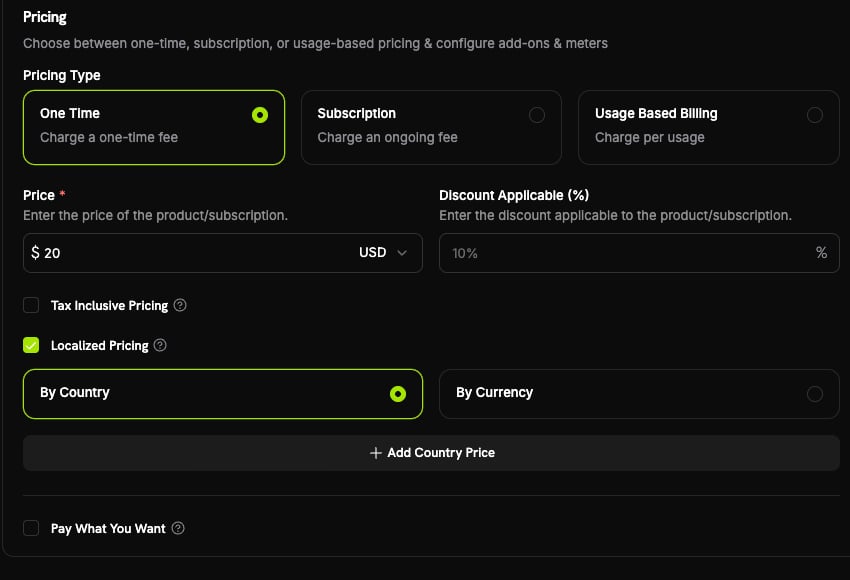 Click **Add Country Price** or **Add Currency Price**, fill in the **Localized pricing** panel, and click **Add**. Each market you add appears in the overrides table, where you can edit or remove it later.
Pick a country, choose the currency, and enter the amount (for example ₹999 for India), then click **Add**.
Click **Add Country Price** or **Add Currency Price**, fill in the **Localized pricing** panel, and click **Add**. Each market you add appears in the overrides table, where you can edit or remove it later.
Pick a country, choose the currency, and enter the amount (for example ₹999 for India), then click **Add**.
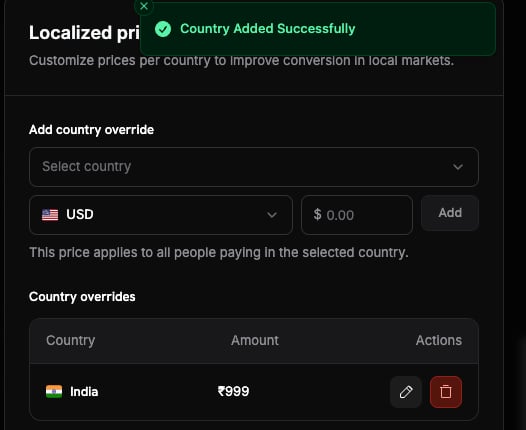
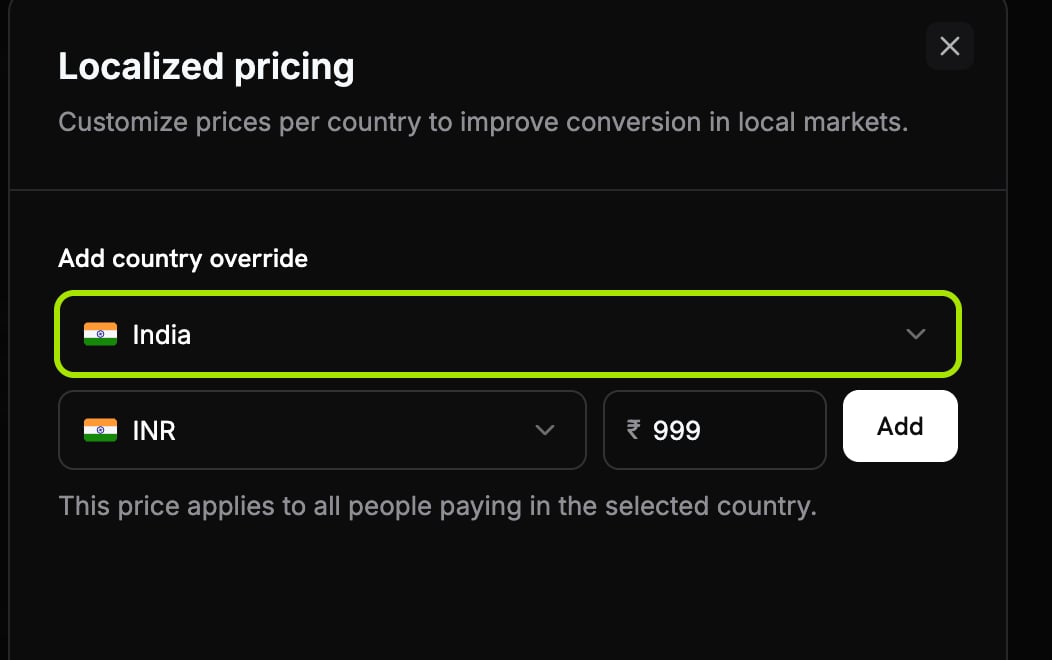 The country now appears in the **Country overrides** table, where you can edit or remove it.
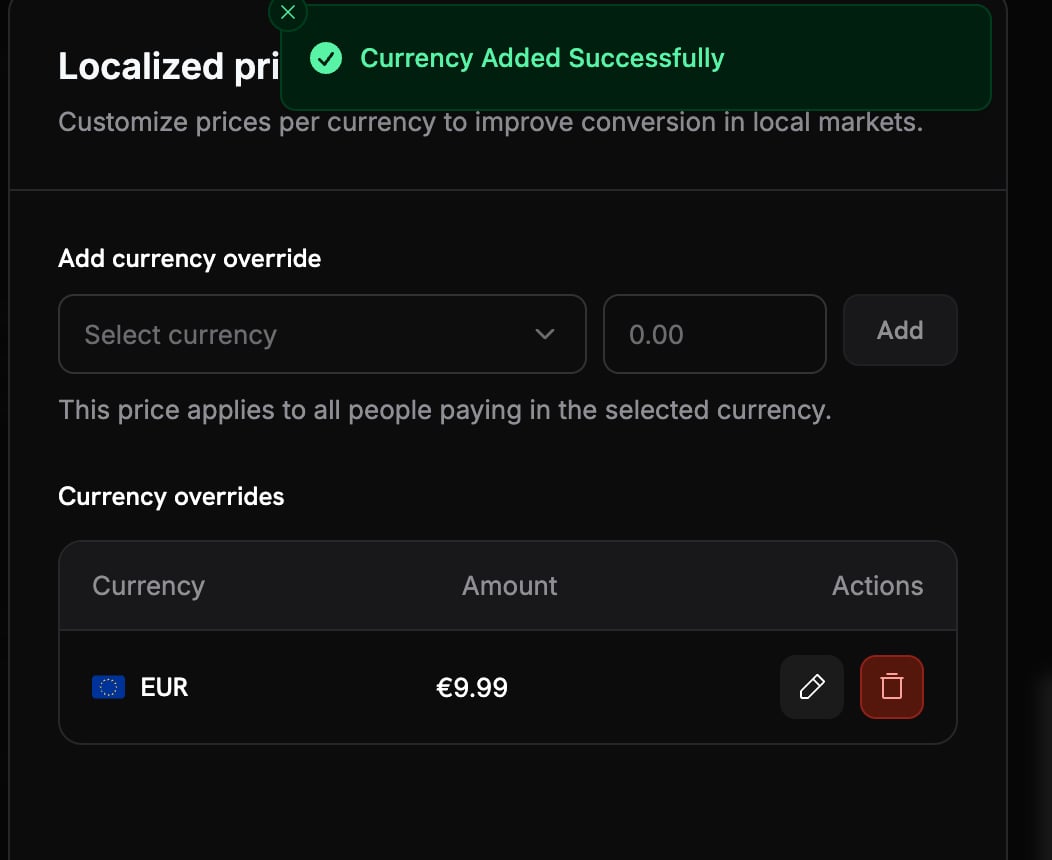
 Pick a currency and enter the amount (for example €9.99 for EUR), then click **Add**.
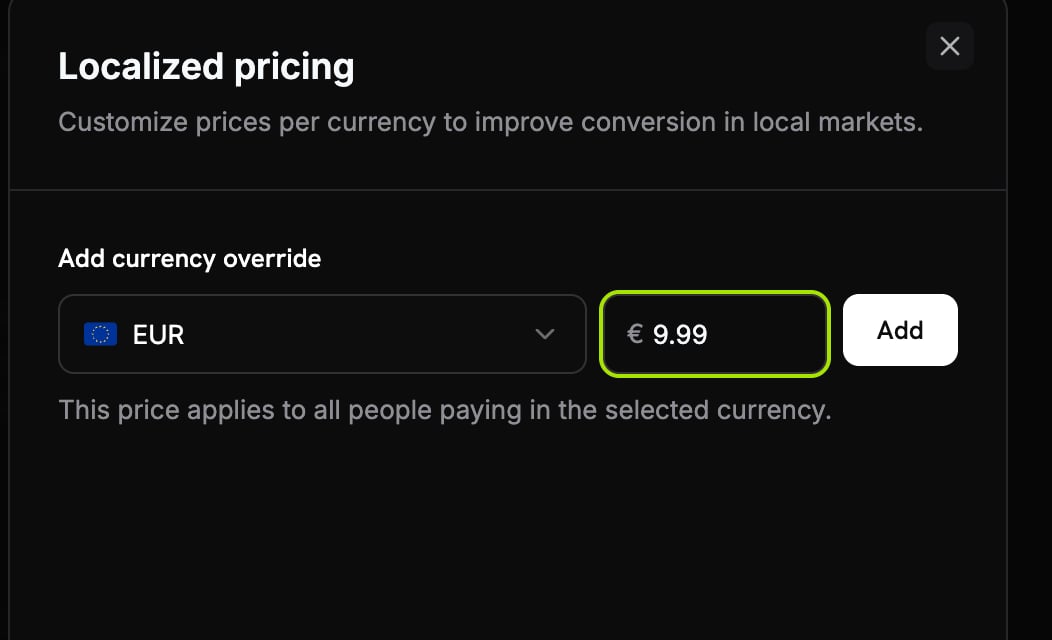 The currency now appears in the **Currency overrides** table, where you can edit or remove it.
 Save with **Add product**. Localized prices apply to future checkouts immediately.
Run a test checkout with a billing country that has a rule, and confirm the localized amount appears.
***
## Manage via API
Localized Pricing is fully available over the API. First set the product's pricing mode, then attach rules.
### Set the pricing mode
Set `pricing_mode` when you create the product (or update an existing one). `null` means base-only, the existing behavior.
```typescript theme={null} theme={null}
import DodoPayments from 'dodopayments';
const client = new DodoPayments({
bearerToken: process.env.DODO_PAYMENTS_API_KEY,
environment: 'test_mode',
});
const product = await client.products.update('pdt_premium_plan', {
pricing_mode: 'by_country',
});
```
```python theme={null} theme={null}
import os
from dodopayments import DodoPayments
client = DodoPayments(
bearer_token=os.environ.get("DODO_PAYMENTS_API_KEY"),
environment="test_mode",
)
product = client.products.update(
"pdt_premium_plan",
pricing_mode="by_country",
)
```
```go theme={null} theme={null}
package main
import (
"context"
"os"
"github.com/dodopayments/dodopayments-go"
"github.com/dodopayments/dodopayments-go/option"
)
func main() {
client := dodopayments.NewClient(
option.WithBearerToken(os.Getenv("DODO_PAYMENTS_API_KEY")),
)
_, err := client.Products.Update(
context.TODO(),
"pdt_premium_plan",
dodopayments.ProductUpdateParams{
PricingMode: dodopayments.F(dodopayments.PricingModeByCountry),
},
)
if err != nil {
panic(err)
}
}
```
### Add a localized price
Attach a rule to the product. In `by_country` mode `country_code` is required; in `by_currency` mode it must be omitted.
```typescript theme={null} theme={null}
// ₹999.00 for customers in India
const localizedPrice = await client.products.localizedPrices.create('pdt_premium_plan', {
currency: 'INR',
country_code: 'IN',
amount: 99900,
});
```
```python theme={null} theme={null}
# ₹999.00 for customers in India
localized_price = client.products.localized_prices.create(
"pdt_premium_plan",
currency="INR",
country_code="IN",
amount=99900,
)
```
```go theme={null} theme={null}
// ₹999.00 for customers in India
localizedPrice, err := client.Products.LocalizedPrices.New(
context.TODO(),
"pdt_premium_plan",
dodopayments.ProductLocalizedPriceNewParams{
Currency: dodopayments.F(dodopayments.CurrencyInr),
CountryCode: dodopayments.F(dodopayments.CountryCodeIn),
Amount: dodopayments.F(int64(99900)),
},
)
```
For a `by_currency` product, omit `country_code`. For example, a flat `€9.99` for everyone paying in EUR (`currency: 'EUR'`, `amount: 999`).
### List, update, and archive
You can update only a rule's `amount`; currency and country are fixed once created. Archiving is an idempotent soft-delete, so the rule stops matching but stays in your history.
```typescript theme={null} theme={null}
// List all active rules on a product
const rules = await client.products.localizedPrices.list('pdt_premium_plan');
// Change the amount (e.g. end a promo)
await client.products.localizedPrices.update('lcp_india_price', {
product_id: 'pdt_premium_plan',
amount: 119900,
});
// Archive a rule
await client.products.localizedPrices.archive('lcp_india_price', {
product_id: 'pdt_premium_plan',
});
```
```python theme={null} theme={null}
# List all active rules on a product
rules = client.products.localized_prices.list("pdt_premium_plan")
# Change the amount (e.g. end a promo)
client.products.localized_prices.update(
"lcp_india_price",
product_id="pdt_premium_plan",
amount=119900,
)
# Archive a rule
client.products.localized_prices.archive(
"lcp_india_price",
product_id="pdt_premium_plan",
)
```
```go theme={null} theme={null}
// List all active rules on a product
rules, err := client.Products.LocalizedPrices.List(context.TODO(), "pdt_premium_plan")
// Change the amount (e.g. end a promo)
_, err = client.Products.LocalizedPrices.Update(
context.TODO(),
"pdt_premium_plan",
"lcp_india_price",
dodopayments.ProductLocalizedPriceUpdateParams{
Amount: dodopayments.F(int64(119900)),
},
)
// Archive a rule
err = client.Products.LocalizedPrices.Archive(
context.TODO(),
"pdt_premium_plan",
"lcp_india_price",
)
```
See the full Product Localized Prices endpoints: create, list, retrieve, update, and archive.
***
## How It Applies at Checkout
Localized pricing is resolved per cart line, and only for products that have a `pricing_mode` set. Dodo Payments reads two signals from the request: the customer's **billing country**, and an optional **`billing_currency`** (when omitted, a currency is derived from the billing country).
* **By Country**: looks for a rule matching the billing country. If one exists, the customer is charged the rule's amount in the rule's currency.
* **By Currency**: looks for a rule matching the customer's currency (the `billing_currency`, or the currency derived from their country). If one exists, the customer is charged the rule's amount in that currency.
* **No match, or no `pricing_mode`**: the base price applies, charged directly when the customer's currency equals the base currency, otherwise converted through [Adaptive Currency](/features/adaptive-currency).
Each cart line is resolved on its own, so you can localize one product and leave others on base pricing in the same checkout. If any line matches a localized rule, the whole transaction is forced fees-inclusive (see [Core Concepts](#core-concepts)).
***
## Important Behaviors
| Behavior | Detail |
| :-------------------------------- | :----------------------------------------------------------------------------------------------------------------------------------------------------------------------------------------------------------------------- |
| **Pre-tax amounts** | A localized amount is the price *before* tax. For tax-exclusive products, tax is added on top at checkout, so the localized amount is not the final total. See [Tax-Inclusive Pricing](/features/tax-inclusive-pricing). |
| **Not for Pay What You Want** | Localized rules never apply to [Pay What You Want](/features/pay-what-you-want) products, where the customer chooses the amount. |
| **By-currency differs from base** | A `by_currency` rule must use a currency different from the product's base currency. |
| **One rule per market** | A product can have at most one active rule per currency (by-currency) or per country (by-country). |
| **All product types** | Applies to one-time, subscription, and usage-based products. |
Localized rule changes do not emit their own webhooks. The resolved amount appears on the resulting payment or subscription exactly like any other price.
***
## Best Practices
* **Keep a sensible base price.** It is the fallback for every market without a rule, converted through Adaptive Currency.
* **Round to local charm prices.** The whole point of a fixed amount is a clean number like ₹999, €9.99, or ¥1000, not an FX result.
* **Pick the mode for the job.** Use `by_country` for purchasing-power pricing; use `by_currency` when one price per currency zone is enough.
* **Archive, don't recreate, for promotions.** Archiving a rule reverts the market to base/adaptive while preserving history; recreate or re-price later as needed.
* **Mind the tax line before advertising a total.** For tax-exclusive products the customer pays the localized amount *plus* tax, so don't quote it as the final price in ads.
***
## Related
Native localized pricing vs. location-based discount codes for PPP.
Automatic FX conversion and the fee handling localized pricing builds on.
Control whether your prices include tax.
Let customers choose the amount. Localized rules do not apply there.
Save with **Add product**. Localized prices apply to future checkouts immediately.
Run a test checkout with a billing country that has a rule, and confirm the localized amount appears.
***
## Manage via API
Localized Pricing is fully available over the API. First set the product's pricing mode, then attach rules.
### Set the pricing mode
Set `pricing_mode` when you create the product (or update an existing one). `null` means base-only, the existing behavior.
```typescript theme={null} theme={null}
import DodoPayments from 'dodopayments';
const client = new DodoPayments({
bearerToken: process.env.DODO_PAYMENTS_API_KEY,
environment: 'test_mode',
});
const product = await client.products.update('pdt_premium_plan', {
pricing_mode: 'by_country',
});
```
```python theme={null} theme={null}
import os
from dodopayments import DodoPayments
client = DodoPayments(
bearer_token=os.environ.get("DODO_PAYMENTS_API_KEY"),
environment="test_mode",
)
product = client.products.update(
"pdt_premium_plan",
pricing_mode="by_country",
)
```
```go theme={null} theme={null}
package main
import (
"context"
"os"
"github.com/dodopayments/dodopayments-go"
"github.com/dodopayments/dodopayments-go/option"
)
func main() {
client := dodopayments.NewClient(
option.WithBearerToken(os.Getenv("DODO_PAYMENTS_API_KEY")),
)
_, err := client.Products.Update(
context.TODO(),
"pdt_premium_plan",
dodopayments.ProductUpdateParams{
PricingMode: dodopayments.F(dodopayments.PricingModeByCountry),
},
)
if err != nil {
panic(err)
}
}
```
### Add a localized price
Attach a rule to the product. In `by_country` mode `country_code` is required; in `by_currency` mode it must be omitted.
```typescript theme={null} theme={null}
// ₹999.00 for customers in India
const localizedPrice = await client.products.localizedPrices.create('pdt_premium_plan', {
currency: 'INR',
country_code: 'IN',
amount: 99900,
});
```
```python theme={null} theme={null}
# ₹999.00 for customers in India
localized_price = client.products.localized_prices.create(
"pdt_premium_plan",
currency="INR",
country_code="IN",
amount=99900,
)
```
```go theme={null} theme={null}
// ₹999.00 for customers in India
localizedPrice, err := client.Products.LocalizedPrices.New(
context.TODO(),
"pdt_premium_plan",
dodopayments.ProductLocalizedPriceNewParams{
Currency: dodopayments.F(dodopayments.CurrencyInr),
CountryCode: dodopayments.F(dodopayments.CountryCodeIn),
Amount: dodopayments.F(int64(99900)),
},
)
```
For a `by_currency` product, omit `country_code`. For example, a flat `€9.99` for everyone paying in EUR (`currency: 'EUR'`, `amount: 999`).
### List, update, and archive
You can update only a rule's `amount`; currency and country are fixed once created. Archiving is an idempotent soft-delete, so the rule stops matching but stays in your history.
```typescript theme={null} theme={null}
// List all active rules on a product
const rules = await client.products.localizedPrices.list('pdt_premium_plan');
// Change the amount (e.g. end a promo)
await client.products.localizedPrices.update('lcp_india_price', {
product_id: 'pdt_premium_plan',
amount: 119900,
});
// Archive a rule
await client.products.localizedPrices.archive('lcp_india_price', {
product_id: 'pdt_premium_plan',
});
```
```python theme={null} theme={null}
# List all active rules on a product
rules = client.products.localized_prices.list("pdt_premium_plan")
# Change the amount (e.g. end a promo)
client.products.localized_prices.update(
"lcp_india_price",
product_id="pdt_premium_plan",
amount=119900,
)
# Archive a rule
client.products.localized_prices.archive(
"lcp_india_price",
product_id="pdt_premium_plan",
)
```
```go theme={null} theme={null}
// List all active rules on a product
rules, err := client.Products.LocalizedPrices.List(context.TODO(), "pdt_premium_plan")
// Change the amount (e.g. end a promo)
_, err = client.Products.LocalizedPrices.Update(
context.TODO(),
"pdt_premium_plan",
"lcp_india_price",
dodopayments.ProductLocalizedPriceUpdateParams{
Amount: dodopayments.F(int64(119900)),
},
)
// Archive a rule
err = client.Products.LocalizedPrices.Archive(
context.TODO(),
"pdt_premium_plan",
"lcp_india_price",
)
```
See the full Product Localized Prices endpoints: create, list, retrieve, update, and archive.
***
## How It Applies at Checkout
Localized pricing is resolved per cart line, and only for products that have a `pricing_mode` set. Dodo Payments reads two signals from the request: the customer's **billing country**, and an optional **`billing_currency`** (when omitted, a currency is derived from the billing country).
* **By Country**: looks for a rule matching the billing country. If one exists, the customer is charged the rule's amount in the rule's currency.
* **By Currency**: looks for a rule matching the customer's currency (the `billing_currency`, or the currency derived from their country). If one exists, the customer is charged the rule's amount in that currency.
* **No match, or no `pricing_mode`**: the base price applies, charged directly when the customer's currency equals the base currency, otherwise converted through [Adaptive Currency](/features/adaptive-currency).
Each cart line is resolved on its own, so you can localize one product and leave others on base pricing in the same checkout. If any line matches a localized rule, the whole transaction is forced fees-inclusive (see [Core Concepts](#core-concepts)).
***
## Important Behaviors
| Behavior | Detail |
| :-------------------------------- | :----------------------------------------------------------------------------------------------------------------------------------------------------------------------------------------------------------------------- |
| **Pre-tax amounts** | A localized amount is the price *before* tax. For tax-exclusive products, tax is added on top at checkout, so the localized amount is not the final total. See [Tax-Inclusive Pricing](/features/tax-inclusive-pricing). |
| **Not for Pay What You Want** | Localized rules never apply to [Pay What You Want](/features/pay-what-you-want) products, where the customer chooses the amount. |
| **By-currency differs from base** | A `by_currency` rule must use a currency different from the product's base currency. |
| **One rule per market** | A product can have at most one active rule per currency (by-currency) or per country (by-country). |
| **All product types** | Applies to one-time, subscription, and usage-based products. |
Localized rule changes do not emit their own webhooks. The resolved amount appears on the resulting payment or subscription exactly like any other price.
***
## Best Practices
* **Keep a sensible base price.** It is the fallback for every market without a rule, converted through Adaptive Currency.
* **Round to local charm prices.** The whole point of a fixed amount is a clean number like ₹999, €9.99, or ¥1000, not an FX result.
* **Pick the mode for the job.** Use `by_country` for purchasing-power pricing; use `by_currency` when one price per currency zone is enough.
* **Archive, don't recreate, for promotions.** Archiving a rule reverts the market to base/adaptive while preserving history; recreate or re-price later as needed.
* **Mind the tax line before advertising a total.** For tax-exclusive products the customer pays the localized amount *plus* tax, so don't quote it as the final price in ads.
***
## Related
Native localized pricing vs. location-based discount codes for PPP.
Automatic FX conversion and the fee handling localized pricing builds on.
Control whether your prices include tax.
Let customers choose the amount. Localized rules do not apply there.