> ## Documentation Index
> Fetch the complete documentation index at: https://docs.dodopayments.com/llms.txt
> Use this file to discover all available pages before exploring further.
# Gửi lại
> Gửi email giao dịch qua Resend khi các sự kiện Dodo Payments xảy ra, chẳng hạn như xác nhận thanh toán, chào mừng người đăng ký và thông báo thanh toán thất bại.
## Giới thiệu
Tích hợp Resend gửi email giao dịch qua Resend khi một sự kiện Dodo Payments xảy ra. Sử dụng tích hợp này để xác nhận thanh toán, chào mừng người đăng ký mới và thông báo cho khách hàng khi thanh toán thất bại, từ tên miền gửi email của riêng bạn.
Tích hợp này yêu cầu API key Resend có **Sending access** và một tên miền gửi email đã được xác minh trong Resend. Bạn cũng cần quyền truy cập vào **Developer → Webhooks** trong dashboard Dodo Payments.
## Bắt đầu
Trong bảng điều khiển Dodo Payments, hãy đi tới **Developer → Webhooks** và nhấp vào **Add endpoint**.
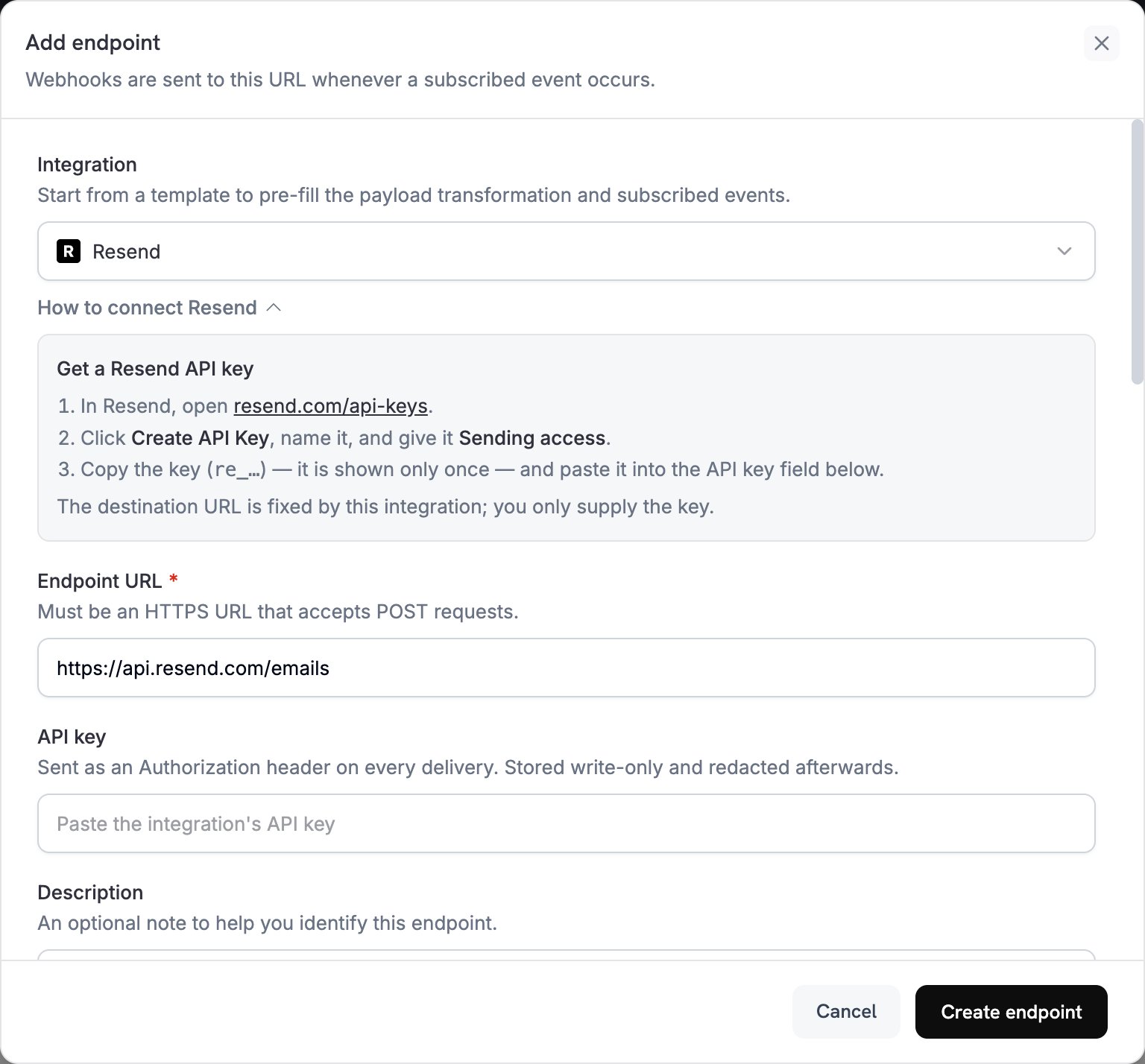 Trong **Integration**, chọn **Resend**. Dashboard sẽ điền **Endpoint URL** và mã chuyển đổi cho Resend, đồng thời bảng **How to connect Resend** sẽ hiển thị các bước thiết lập.
Trong Resend, mở [API Keys](https://resend.com/api-keys), nhấp vào **Create API Key** và cấp cho key quyền **Sending access**. Resend chỉ hiển thị key bắt đầu bằng `re_` một lần. Dán key đó vào **API key**. Dodo Payments gửi key này dưới dạng bearer token trong header `Authorization` của mọi request đến Resend.
Trong **Subscribed events**, chỉ chọn các sự kiện mà mã chuyển đổi của bạn xử lý. Một sự kiện không được mã chuyển đổi thay đổi sẽ đến Resend theo định dạng Dodo Payments và bị Resend từ chối.
Trong **Transformation code**, chỉnh sửa handler để mỗi sự kiện đã đăng ký trở thành một email Resend. Bắt đầu với [các ví dụ](#transformation-code-examples).
Trong **Test this code**, chọn một loại sự kiện và nhấp vào **Simulate** để xem trước request gửi đến Resend. Sau đó nhấp vào **Create endpoint**.
Dodo Payments giờ đây sẽ gửi email qua Resend cho mỗi sự kiện đã đăng ký. Để xem từng lần gửi và phản hồi của Resend, mở tab **Logs** trong **Developer → Webhooks**.
## Ví dụ về mã chuyển đổi
Mỗi handler đặt `webhook.url` thành endpoint gửi email của Resend và thay `webhook.payload` bằng email. Số tiền của Dodo Payments được tính theo đơn vị tiền tệ nhỏ nhất, vì vậy các ví dụ chia cho 100 và hiển thị mã tiền tệ. Đối với các loại tiền tệ không có chữ số thập phân như JPY và KRW, hãy sử dụng nguyên giá trị số tiền.
### Email xác nhận thanh toán
Gửi biên lai khi thanh toán thành công (`payment.succeeded`):
```javascript payment_confirmation.js icon="js" expandable theme={null}
function handler(webhook) {
if (webhook.eventType === "payment.succeeded") {
const p = webhook.payload.data;
webhook.url = "https://api.resend.com/emails";
webhook.payload = {
from: "payments@yourdomain.com",
to: [p.customer.email],
subject: "Payment Confirmation - " + (p.total_amount / 100).toFixed(2) + " " + p.currency,
html: `
Trong **Integration**, chọn **Resend**. Dashboard sẽ điền **Endpoint URL** và mã chuyển đổi cho Resend, đồng thời bảng **How to connect Resend** sẽ hiển thị các bước thiết lập.
Trong Resend, mở [API Keys](https://resend.com/api-keys), nhấp vào **Create API Key** và cấp cho key quyền **Sending access**. Resend chỉ hiển thị key bắt đầu bằng `re_` một lần. Dán key đó vào **API key**. Dodo Payments gửi key này dưới dạng bearer token trong header `Authorization` của mọi request đến Resend.
Trong **Subscribed events**, chỉ chọn các sự kiện mà mã chuyển đổi của bạn xử lý. Một sự kiện không được mã chuyển đổi thay đổi sẽ đến Resend theo định dạng Dodo Payments và bị Resend từ chối.
Trong **Transformation code**, chỉnh sửa handler để mỗi sự kiện đã đăng ký trở thành một email Resend. Bắt đầu với [các ví dụ](#transformation-code-examples).
Trong **Test this code**, chọn một loại sự kiện và nhấp vào **Simulate** để xem trước request gửi đến Resend. Sau đó nhấp vào **Create endpoint**.
Dodo Payments giờ đây sẽ gửi email qua Resend cho mỗi sự kiện đã đăng ký. Để xem từng lần gửi và phản hồi của Resend, mở tab **Logs** trong **Developer → Webhooks**.
## Ví dụ về mã chuyển đổi
Mỗi handler đặt `webhook.url` thành endpoint gửi email của Resend và thay `webhook.payload` bằng email. Số tiền của Dodo Payments được tính theo đơn vị tiền tệ nhỏ nhất, vì vậy các ví dụ chia cho 100 và hiển thị mã tiền tệ. Đối với các loại tiền tệ không có chữ số thập phân như JPY và KRW, hãy sử dụng nguyên giá trị số tiền.
### Email xác nhận thanh toán
Gửi biên lai khi thanh toán thành công (`payment.succeeded`):
```javascript payment_confirmation.js icon="js" expandable theme={null}
function handler(webhook) {
if (webhook.eventType === "payment.succeeded") {
const p = webhook.payload.data;
webhook.url = "https://api.resend.com/emails";
webhook.payload = {
from: "payments@yourdomain.com",
to: [p.customer.email],
subject: "Payment Confirmation - " + (p.total_amount / 100).toFixed(2) + " " + p.currency,
html: `
Payment Successful!
Hi ${p.customer.name},
Your payment of ${(p.total_amount / 100).toFixed(2)} ${p.currency} has been processed successfully.
- Payment ID: ${p.payment_id}
- Amount: ${(p.total_amount / 100).toFixed(2)} ${p.currency}
- Date: ${new Date(webhook.payload.timestamp).toLocaleDateString()}
- Method: ${p.payment_method || "Unknown"}
Thank you for your business!
`,
text: `Payment Successful! Your payment of ${(p.total_amount / 100).toFixed(2)} ${p.currency} has been processed. Payment ID: ${p.payment_id}`
};
}
return webhook;
}
```
### Email chào mừng người đăng ký
Chào mừng khách hàng khi gói đăng ký chuyển sang trạng thái hoạt động (`subscription.active`):
```javascript subscription_welcome.js icon="js" expandable theme={null}
function handler(webhook) {
if (webhook.eventType === "subscription.active") {
const s = webhook.payload.data;
webhook.url = "https://api.resend.com/emails";
webhook.payload = {
from: "welcome@yourdomain.com",
to: [s.customer.email],
subject: "Welcome to Your Subscription!",
html: `
Welcome to Your Subscription!
Hi ${s.customer.name},
Your subscription has been activated successfully.
- Subscription ID: ${s.subscription_id}
- Product: ${s.product_id}
- Amount: ${(s.recurring_pre_tax_amount / 100).toFixed(2)} ${s.currency}/${s.payment_frequency_interval}
- Next Billing: ${new Date(s.next_billing_date).toLocaleDateString()}
You can manage your subscription anytime from your account dashboard.
`,
text: `Welcome! Your subscription is now active. Amount: ${(s.recurring_pre_tax_amount / 100).toFixed(2)} ${s.currency}/${s.payment_frequency_interval}`
};
}
return webhook;
}
```
### Thông báo thanh toán thất bại
Yêu cầu khách hàng cập nhật phương thức thanh toán khi thanh toán thất bại (`payment.failed`):
```javascript payment_failure.js icon="js" expandable theme={null}
function handler(webhook) {
if (webhook.eventType === "payment.failed") {
const p = webhook.payload.data;
webhook.url = "https://api.resend.com/emails";
webhook.payload = {
from: "support@yourdomain.com",
to: [p.customer.email],
subject: "Payment Failed - Action Required",
html: `
Payment Failed
Hi ${p.customer.name},
We were unable to process your payment of ${(p.total_amount / 100).toFixed(2)} ${p.currency}.
- Payment ID: ${p.payment_id}
- Amount: ${(p.total_amount / 100).toFixed(2)} ${p.currency}
- Error: ${p.error_message || "Payment processing failed"}
Please update your payment method or contact support for assistance.
Update Payment Method
`,
text: `Payment Failed: We couldn't process your ${(p.total_amount / 100).toFixed(2)} ${p.currency} payment. Please update your payment method.`
};
}
return webhook;
}
```
## Mẹo
* Gửi email từ tên miền bạn đã xác minh trong Resend để cải thiện khả năng gửi email thành công.
* Bao gồm cả phiên bản `html` và `text` của mỗi email.
* Cá nhân hóa nội dung bằng dữ liệu khách hàng từ payload, chẳng hạn như `customer.name`.
* Viết tiêu đề email nêu rõ kết quả hoặc hành động cần thực hiện.
* Bao gồm liên kết hủy đăng ký trong mọi email có nội dung tiếp thị.
* Xem trước từng template bằng **Simulate** trước khi tạo endpoint.
* Để bỏ qua một sự kiện trong code, đặt `webhook.cancel = true` trước khi trả về webhook. Logs ghi nhận lần gửi bị bỏ qua là thành công.
## Khắc phục sự cố
* Kiểm tra API key có chính xác, đang hoạt động và có quyền **Sending access** hay không. Để thay thế key, chỉnh sửa endpoint và dán key mới vào **API key**.
* Kiểm tra tên miền người gửi đã được xác minh trong Resend.
* Kiểm tra địa chỉ email người nhận có hợp lệ hay không.
* Kiểm tra giới hạn và hạn ngạch gửi email của Resend đối với gói của bạn.
* Mở tab **Logs** trong **Developer → Webhooks** và đọc phản hồi của Resend đối với lần gửi thất bại.
* Kiểm tra payload có khớp với định dạng send-email của Resend hay không. Resend yêu cầu `from`, `to` và `subject`.
* Kiểm tra mọi sự kiện mà code của bạn xử lý đều đặt tất cả các trường bắt buộc.
* Kiểm tra giá trị `html` có phải là HTML đúng định dạng hay không.
* Kiểm tra địa chỉ `from` sử dụng tên miền đã được xác minh trong Resend.
This documentation is built and hosted on [Mintlify](https://mintlify.com), a developer documentation platform.