在支付事件发生时,自动将您的付费客户同步到 MailerLite 订阅者列表。将客户添加到特定组,触发自动化工作流,并使用真实的支付数据保持您的电子邮件营销列表的最新状态。
MailerLite 是一个强大的电子邮件营销平台,适用于新闻通讯、活动和自动化。此集成帮助您根据支付活动自动管理订阅者 - 非常适合入职序列、客户细分和有针对性的营销活动。
开始使用
Open the Webhook Section
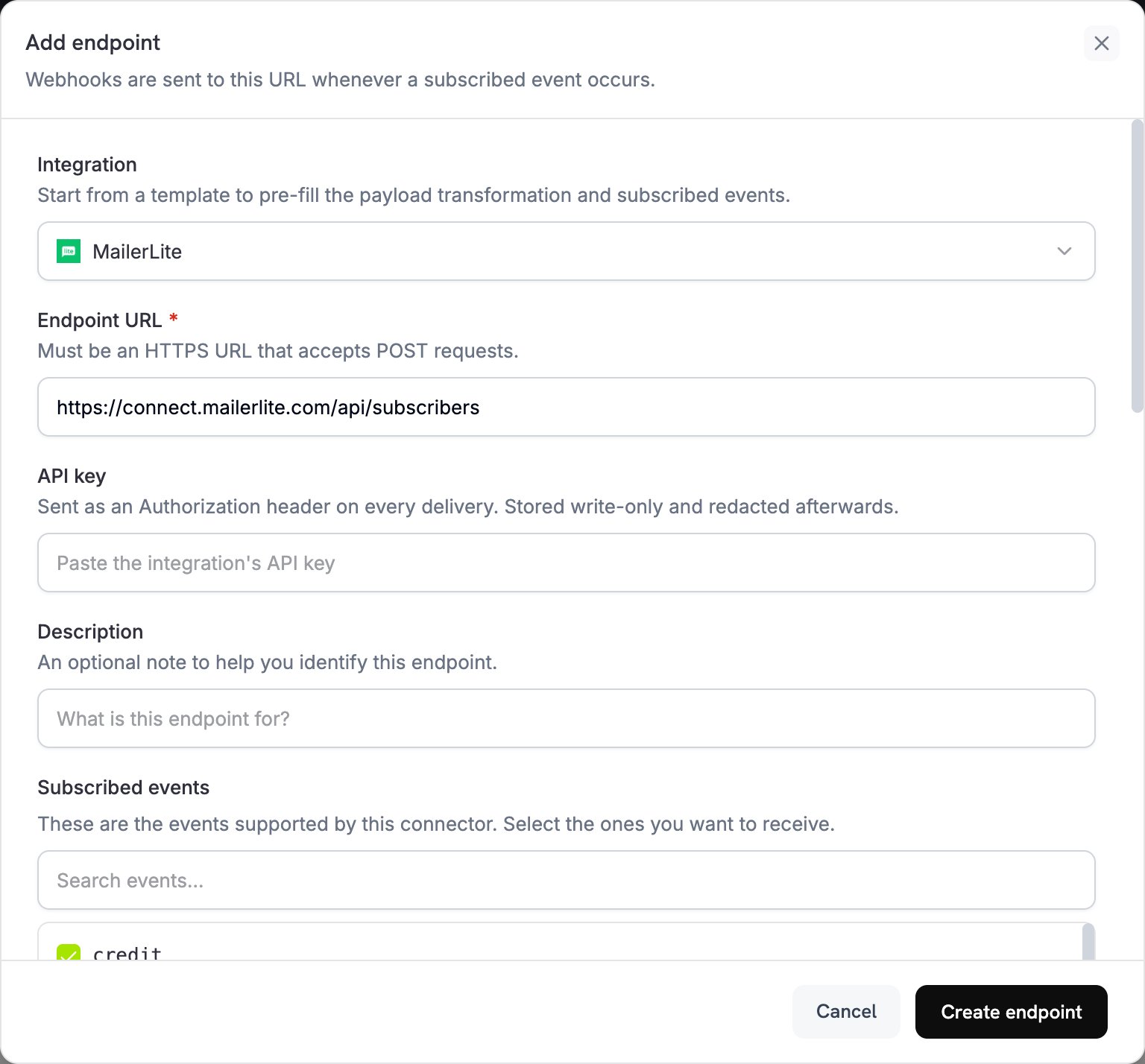
在您的 Dodo Payments 仪表板中,导航到 Webhooks + Add Endpoint 并展开集成下拉菜单。
Select MailerLite
选择 MailerLite 集成卡片。
Enter API Key
在配置中提供您的 MailerLite API 密钥。
Configure Transformation
编辑转换代码以将订阅者数据格式化为 MailerLite 的 API 所需格式。
Test & Create
使用示例有效负载进行测试,然后点击 Create 以激活订阅者同步。
Done!
付款事件现在将自动将客户同步到您的 MailerLite 列表。
转换代码示例
在成功支付时添加客户
function handler ( webhook ) {
if ( webhook . eventType === "payment.succeeded" ) {
const p = webhook . payload . data ;
webhook . url = "https://connect.mailerlite.com/api/subscribers" ;
webhook . payload = {
email: p . customer . email ,
fields: {
name: p . customer . name ,
company: p . customer . business_name || "" ,
last_name: ""
},
groups: [ "your-group-id-here" ],
status: "active"
};
}
return webhook ;
}
See all 17 lines
根据产品将订阅者添加到多个组
function handler ( webhook ) {
if ( webhook . eventType === "payment.succeeded" ) {
const p = webhook . payload . data ;
// Determine groups based on product or amount
const groups = [ "customers-group-id" ];
// Add to premium group if high-value purchase
if ( p . total_amount >= 10000 ) { // $100+
groups . push ( "premium-customers-group-id" );
}
webhook . url = "https://connect.mailerlite.com/api/subscribers" ;
webhook . payload = {
email: p . customer . email ,
fields: {
name: p . customer . name ,
last_purchase_amount: ( p . total_amount / 100 ). toFixed ( 2 ),
last_purchase_date: new Date ( webhook . payload . timestamp ). toISOString (). split ( 'T' )[ 0 ],
payment_id: p . payment_id
},
groups: groups ,
status: "active"
};
}
return webhook ;
}
See all 27 lines
在订阅激活时添加新订阅者
subscription_subscriber.js
function handler ( webhook ) {
if ( webhook . eventType === "subscription.active" ) {
const s = webhook . payload . data ;
webhook . url = "https://connect.mailerlite.com/api/subscribers" ;
webhook . payload = {
email: s . customer . email ,
fields: {
name: s . customer . name ,
subscription_plan: s . product_id ,
subscription_amount: ( s . recurring_pre_tax_amount / 100 ). toFixed ( 2 ),
billing_frequency: s . payment_frequency_interval ,
subscription_start: new Date (). toISOString (). split ( 'T' )[ 0 ]
},
groups: [ "subscribers-group-id" , "active-subscriptions-group-id" ],
status: "active"
};
}
return webhook ;
}
See all 19 lines
在订阅取消时更新订阅者
subscription_cancelled.js
function handler ( webhook ) {
if ( webhook . eventType === "subscription.cancelled" ) {
const s = webhook . payload . data ;
// Use PUT to update existing subscriber
webhook . url = "https://connect.mailerlite.com/api/subscribers/" + encodeURIComponent ( s . customer . email );
webhook . method = "PUT" ;
webhook . payload = {
fields: {
subscription_status: "cancelled" ,
cancellation_date: new Date (). toISOString (). split ( 'T' )[ 0 ]
},
groups: [ "churned-customers-group-id" ]
};
}
return webhook ;
}
See all 16 lines
使用自定义字段添加客户
function handler ( webhook ) {
if ( webhook . eventType === "payment.succeeded" ) {
const p = webhook . payload . data ;
webhook . url = "https://connect.mailerlite.com/api/subscribers" ;
webhook . payload = {
email: p . customer . email ,
fields: {
name: p . customer . name ,
company: p . customer . business_name || "" ,
country: p . customer . country || "" ,
city: p . customer . city || "" ,
phone: p . customer . phone || "" ,
// Custom fields (must be created in MailerLite first)
total_spent: ( p . total_amount / 100 ). toFixed ( 2 ),
customer_since: new Date (). toISOString (). split ( 'T' )[ 0 ],
payment_method: p . payment_method || "unknown" ,
currency: p . currency || "USD"
},
groups: [ "paying-customers-group-id" ],
status: "active" ,
subscribed_at: new Date (). toISOString (). replace ( 'T' , ' ' ). split ( '.' )[ 0 ]
};
}
return webhook ;
}
See all 25 lines
通过事件触发自动化
function handler ( webhook ) {
if ( webhook . eventType === "payment.succeeded" ) {
const p = webhook . payload . data ;
// First, ensure subscriber exists
webhook . url = "https://connect.mailerlite.com/api/subscribers" ;
webhook . payload = {
email: p . customer . email ,
fields: {
name: p . customer . name ,
// Add a trigger field that your automation watches
last_payment_trigger: new Date (). toISOString (),
last_payment_amount: ( p . total_amount / 100 ). toFixed ( 2 )
},
status: "active"
};
// Tip: Create an automation in MailerLite that triggers
// when 'last_payment_trigger' field is updated
}
return webhook ;
}
See all 22 lines
在使用自定义字段之前,请在 MailerLite 中创建它们
使用组根据产品、计划级别或购买行为对客户进行细分
在 MailerLite 中设置在字段更新时触发的自动化工作流
使用 upsert 行为(POST 到 /subscribers)以避免重复订阅者错误
在自定义字段中存储支付元数据以获得更好的客户洞察
在为所有支付启用之前,先对小组进行测试
自定义字段设置
在使用自定义字段之前,您需要在 MailerLite 中创建它们:
转到您的 MailerLite 仪表板
转到 Subscribers Fields
点击 Create field 并添加如下字段:
total_spent(数字)
customer_since(日期)
subscription_plan(文本)
payment_method(文本)
last_payment_amount(数字)
故障排除
Subscribers not being added
验证 API 密钥是否正确且处于激活状态
检查电子邮件地址是否有效(符合 RFC 2821)
确保组 ID 正确且在您的帐户中存在
注意:已取消订阅、弹回或被标记为垃圾邮件的订阅者无法通过 API 重新激活
Custom fields not updating
在使用自定义字段前请先确保它们在 MailerLite 中已存在
检查字段名称完全匹配(区分大小写)
确保字段值匹配预期类型(文本、数字、日期)
MailerLite API 的速率限制为每分钟 120 次请求
如果处理大量订阅者,请使用批量端点
在高并发场景中实施退避策略
Group assignment not working
验证组 ID 是数字字符串
检查这些组是否存在于您的 MailerLite 帐户中
注意:使用 PUT 更新组将把订阅者从未列出的组中移除
API 参考
MailerLite 订阅者 API 接受以下关键参数:
参数 类型 是否必填 描述 emailstring 是 有效电子邮件地址(RFC 2821) fieldsobject 否 包含字段名/字段值对的对象 fields.namestring 否 订阅者的名字 fields.last_namestring 否 订阅者的姓氏 fields.companystring 否 公司名称 fields.countrystring 否 国家/地区 fields.citystring 否 城市 fields.phonestring 否 电话号码 groupsarray 否 要添加订阅者的组 ID 数组 statusstring 否 可选值之一:active、unsubscribed、unconfirmed、bounced、junk subscribed_atstring 否 以 yyyy-MM-dd HH:mm:ss 格式表示的日期 ip_addressstring 否 订阅者的 IP 地址
有关完整的 API 文档,请访问 MailerLite 开发者 . Last modified on February 27, 2026