

Apa itu Penagihan Berbasis Kredit?
Penagihan Berbasis Kredit memberi Anda sistem fleksibel untuk memberikan hak kredit kepada pelanggan sebagai bagian dari produk Anda. Alih-alih menagih per penggunaan atau membatasi akses melalui fitur flags, Anda mengalokasikan sejumlah kredit yang dapat digunakan pelanggan saat mereka menggunakan layanan Anda. Kredit cocok digunakan untuk:- Platform AI dan LLM: Berikan token atau kredit generasi per tingkat rencana
- Layanan API: Alokasikan kredit panggilan API dengan harga kelebihan
- Platform Infrastruktur: Berikan kredit jam komputasi atau penyimpanan
- Layanan Komunikasi: Sediakan kredit pesan atau menit per langganan
- SaaS dengan tingkat konsumsi: Gabungkan penggunaan yang termasuk dalam kumpulan kredit
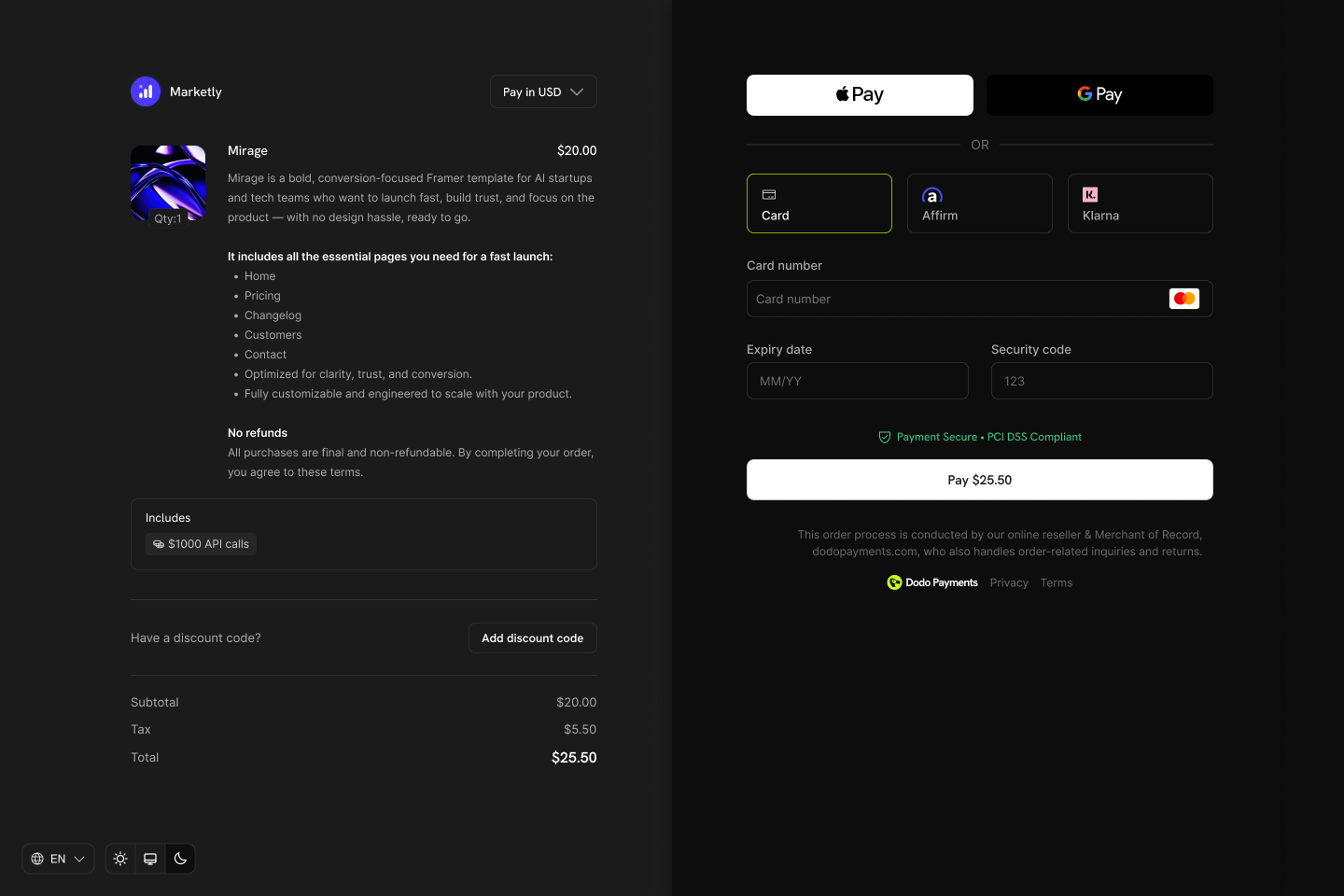
Credits appear as entitlements on your products and show in checkout, customer portal, and subscription details.
Konsep Inti
Jenis Kredit
Saat membuat kredit, Anda memilih antara dua jenis:- Custom Unit
- Fiat Credits
Siklus Hidup Kredit
Kredit mengikuti siklus hidup yang jelas dari penerbitan hingga konsumsi:Credits Issued
Credits Consumed
Credits Expire or Roll Over
Overage Handling
Sumber Pemberian
Kredit dapat diberikan dari beberapa sumber:Membuat Kredit
Buat hak kredit di bagian Produk → Kredit dari dasbor Anda. Setiap kredit mendefinisikan unit, presisi, aturan kedaluwarsa, dan perilaku siklus hidup.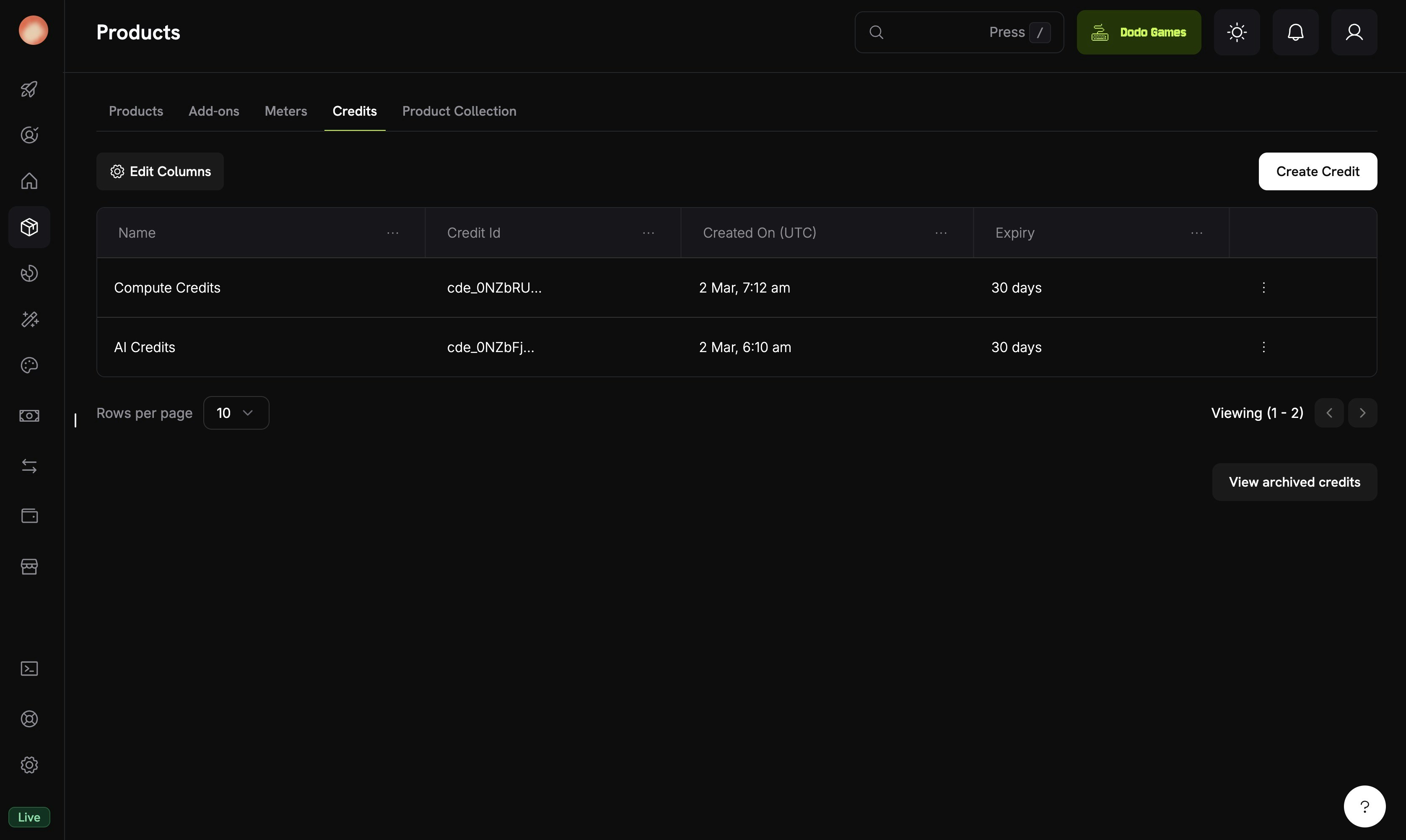
The Credits tab under Products shows all your credit entitlements.
Navigate to Credits
Configure Basic Information
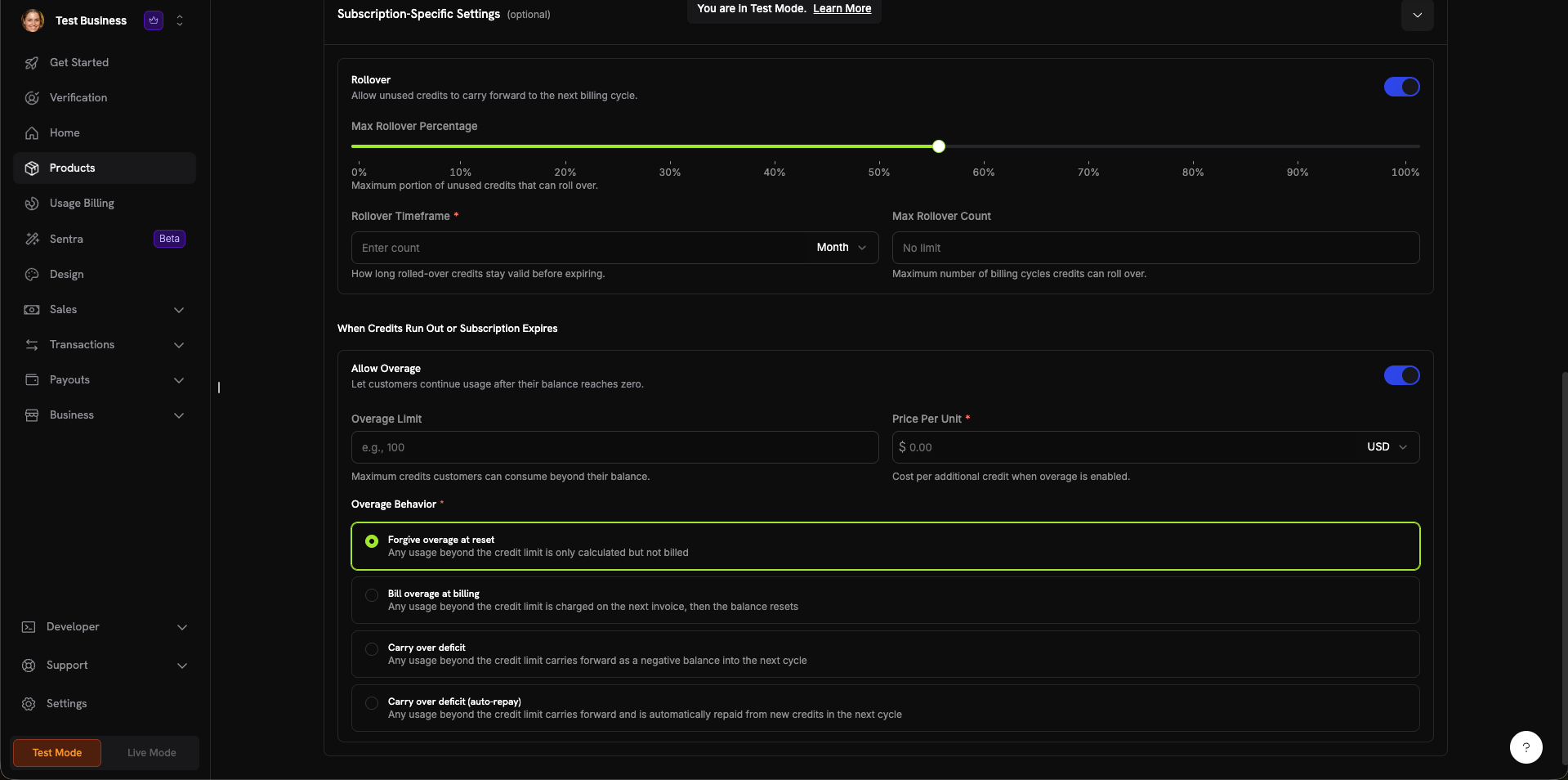
The credit creation form with all configuration sections.
Set General Settings
- Custom Unit: Tentukan metrik Anda sendiri (token, panggilan API, jam komputasi). Memerlukan Unit Name (misalnya, “Platform tokens”) dan pengaturan Precision.
- Fiat Credits: Kredit merepresentasikan nilai mata uang nyata. Memerlukan pilihan Unit Currency (USD, EUR, GBP, INR, dan lainnya).
0 hingga 10:0: Bilangan bulat (paling sesuai untuk item yang dapat dihitung seperti panggilan API)1: Satu angka desimal (0.0)2: Dua angka desimal (0.00)—default3: Tiga angka desimal (0.000)- Hingga
10: Untuk unit berpresisi tinggi (misalnya, token pecahan atau micro-usage)
- 7 hari, 30 hari (default), 60 hari, 90 hari, Kustom, atau Tidak Pernah
Configure Subscription Settings (Optional)
- Max Rollover Percentage (0–100%): Batasi jumlah yang dapat diteruskan
- Rollover Timeframe: Berapa lama kredit yang diteruskan tetap valid (misalnya, 1 Month)
- Max Rollover Count: Jumlah rollover berturut-turut maksimum sebelum kredit hangus
- Overage Limit: Jumlah kredit maksimum yang dapat digunakan pelanggan melebihi saldo mereka
- Price Per Unit: Biaya per kredit tambahan ketika overage diaktifkan (dengan pemilih mata uang)
- Forgive overage at reset (default): Penggunaan yang melebihi batas kredit dicatat tetapi tidak ditagihkan. Saldo direset pada setiap cycle.
- Bill overage at billing: Penggunaan yang melebihi batas kredit ditagihkan pada invoice berikutnya, lalu saldo direset.
- Carry over deficit: Penggunaan yang melebihi batas kredit diteruskan sebagai saldo negatif ke cycle berikutnya.
- Carry over deficit (auto-repay): Defisit diteruskan dan secara otomatis dibayar dari kredit baru pada cycle berikutnya.
Create Credit
Attaching Credits to Products
Kredit dilampirkan ke produk sebagai hak dalam alur pembuatan atau pengeditan produk. Anda dapat melampirkan hingga 5 kredit per produk. Kredit berfungsi dengan ketiga jenis penetapan harga.Subscription Products
For subscriptions, credits are issued per billing cycle and can be configured with proration, trial credits, and cycle-specific settings.Create or Edit a Subscription Product
Open Entitlements Section
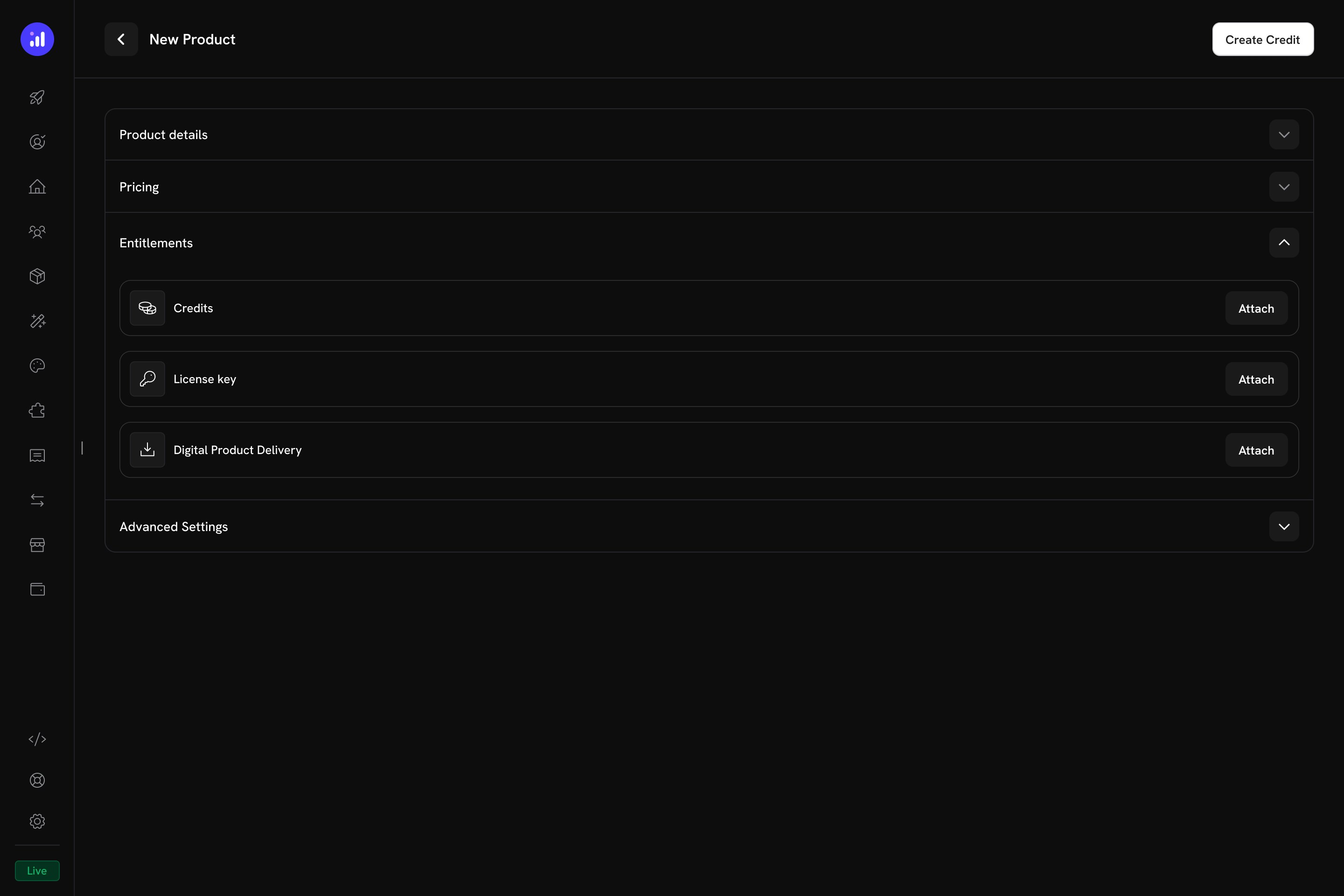
The Entitlements section in the product form with Credits, License Key, and Digital Product Delivery options.
Select Credits to Attach
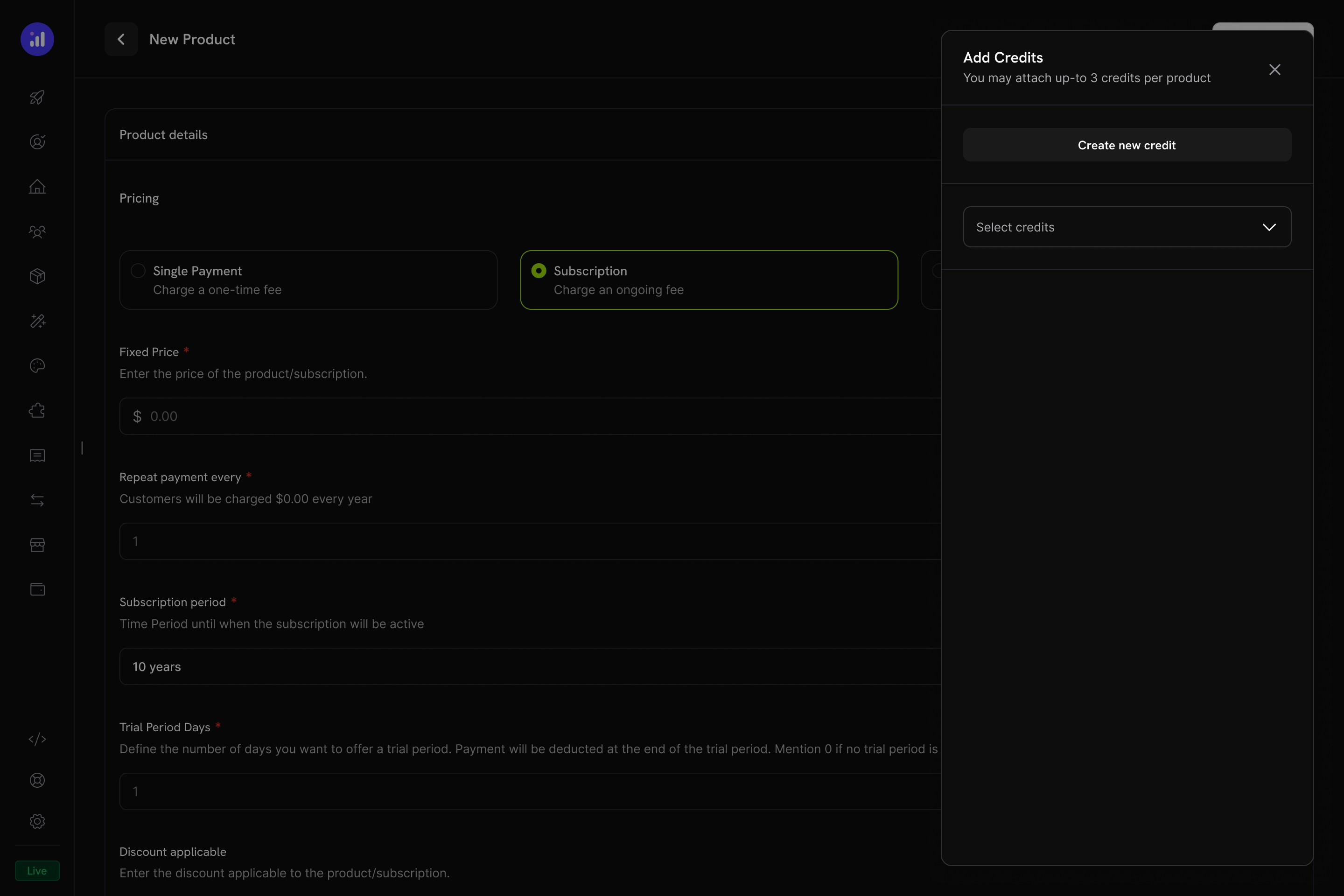
The Add Credits panel lets you select existing credits or create new ones.
Configure Credit Settings
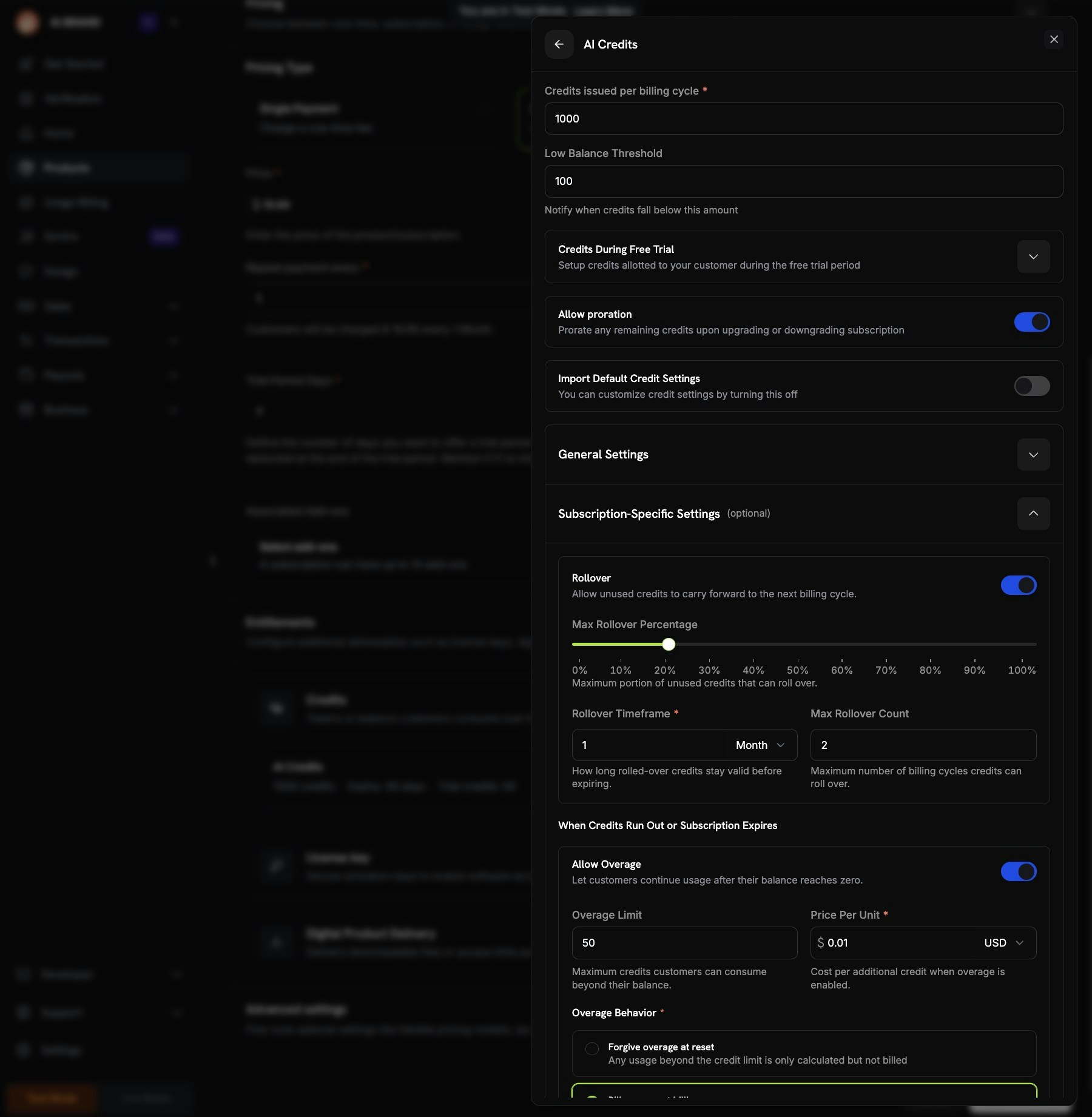
Credit configuration showing per-cycle amount, trial credits, proration, and custom settings.
Review and Add
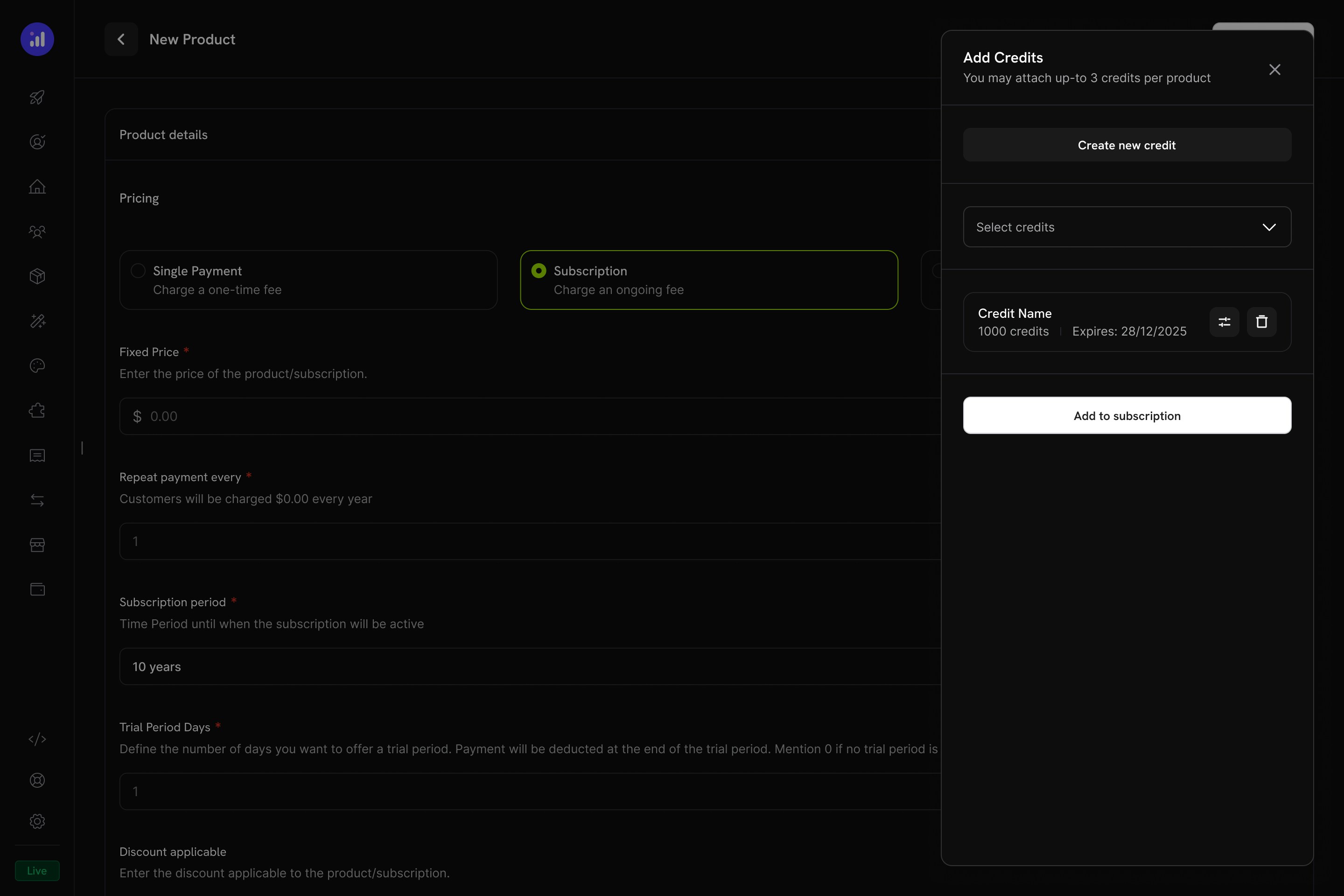
Review attached credits before adding them to the subscription.
One-Time Payment Products
For one-time payments, credits are issued once at the time of purchase.Create a One-Time Product
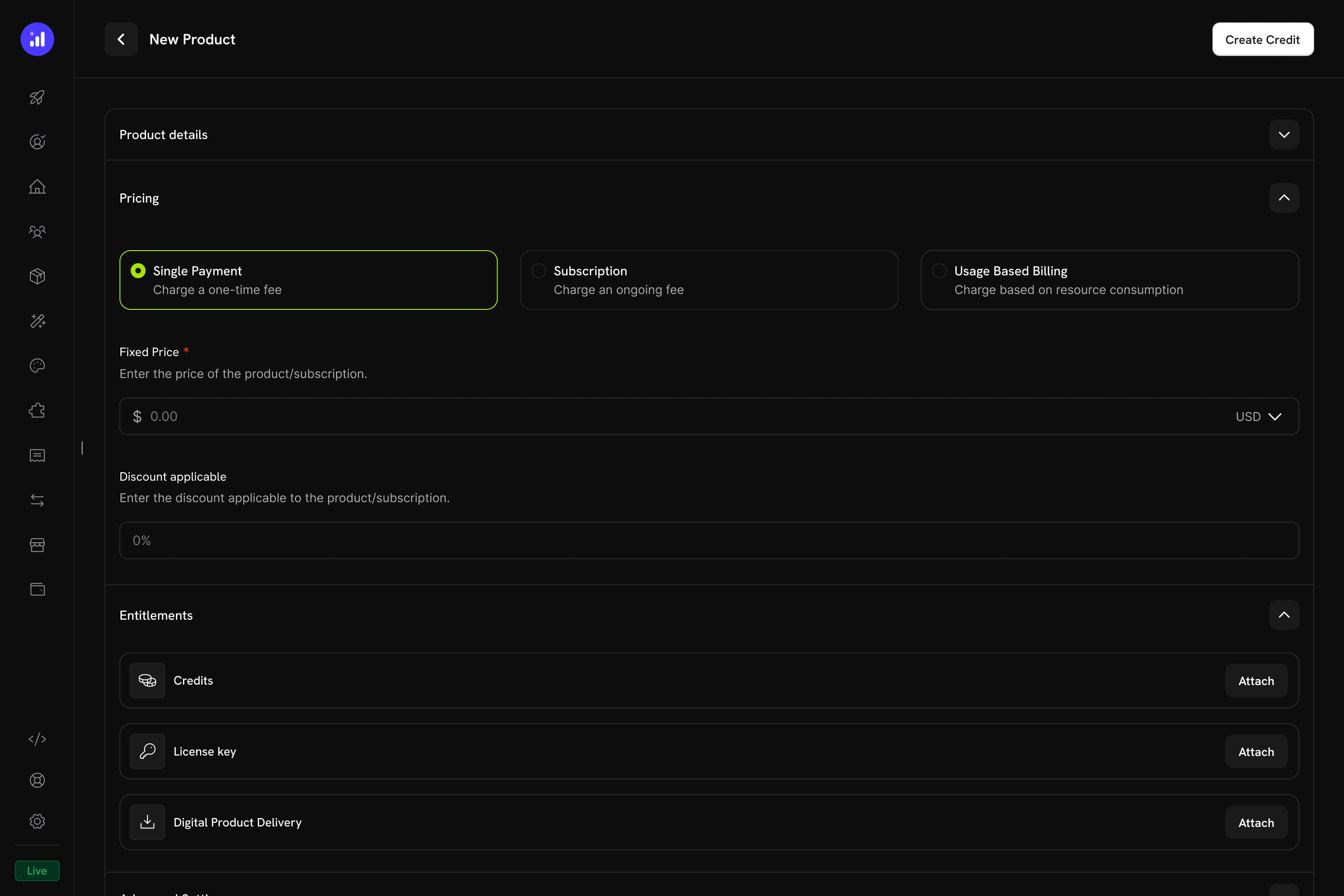
Single Payment pricing selected for a one-time credit product.
Attach Credits
Usage-Based Billing Products
For usage-based products, credits are linked to meters and automatically deducted based on real-time consumption events.Create a Usage-Based Product
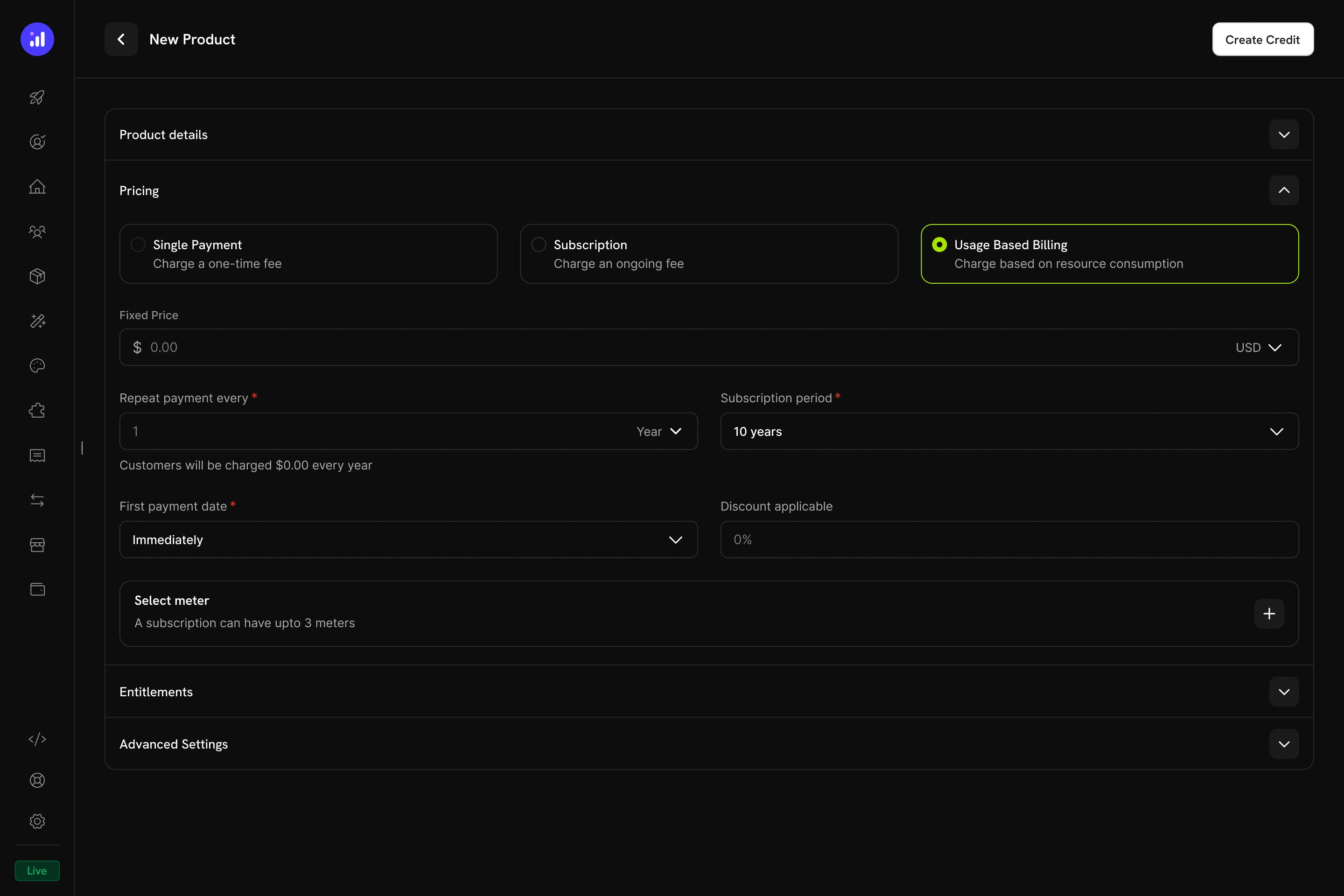
Usage Based Billing pricing type with meter configuration.
Add a Meter
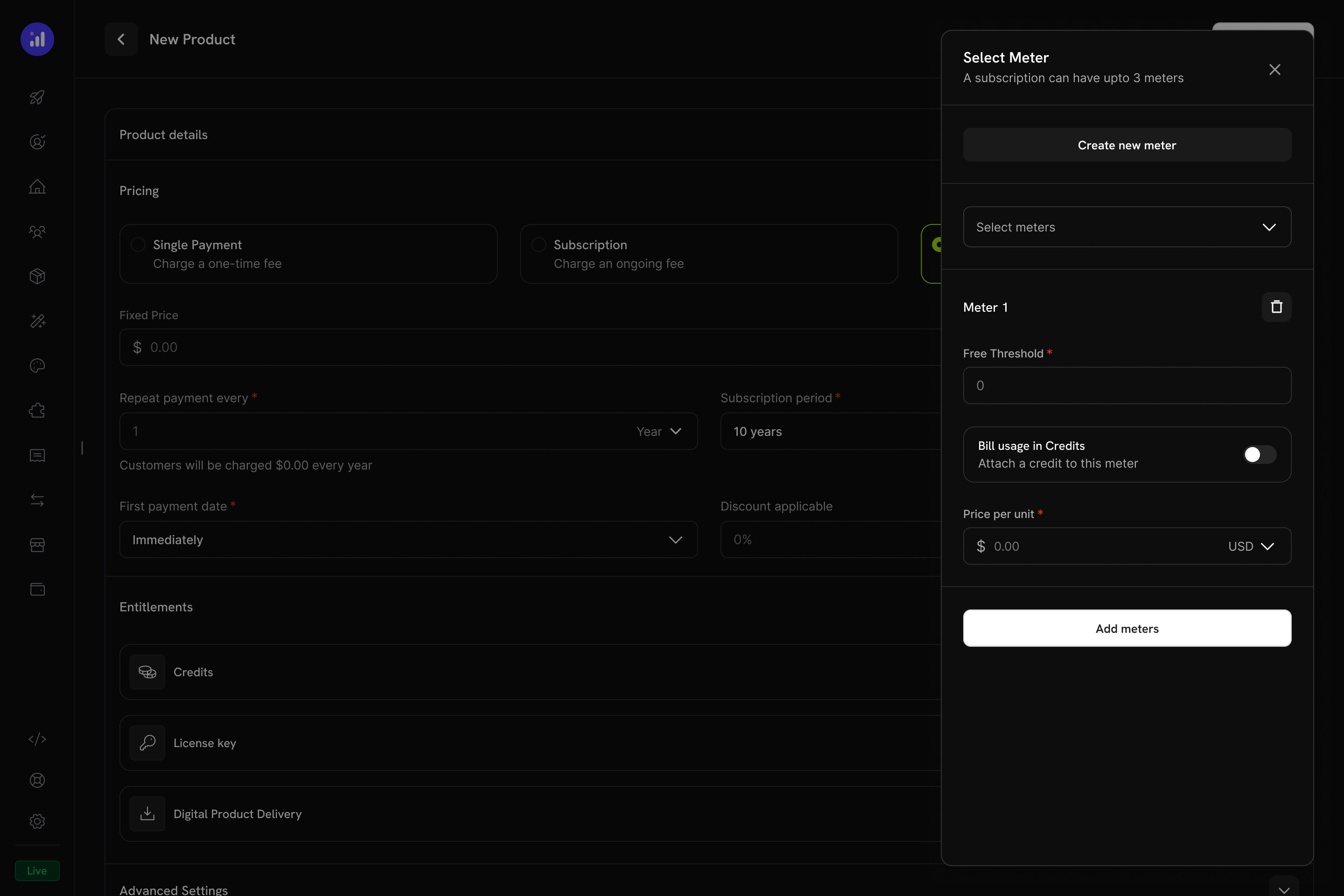
The Select Meter panel with meter configuration and credit toggle.
Enable Credit Billing on the Meter
1000, then 1,000 API calls consume 1 credit.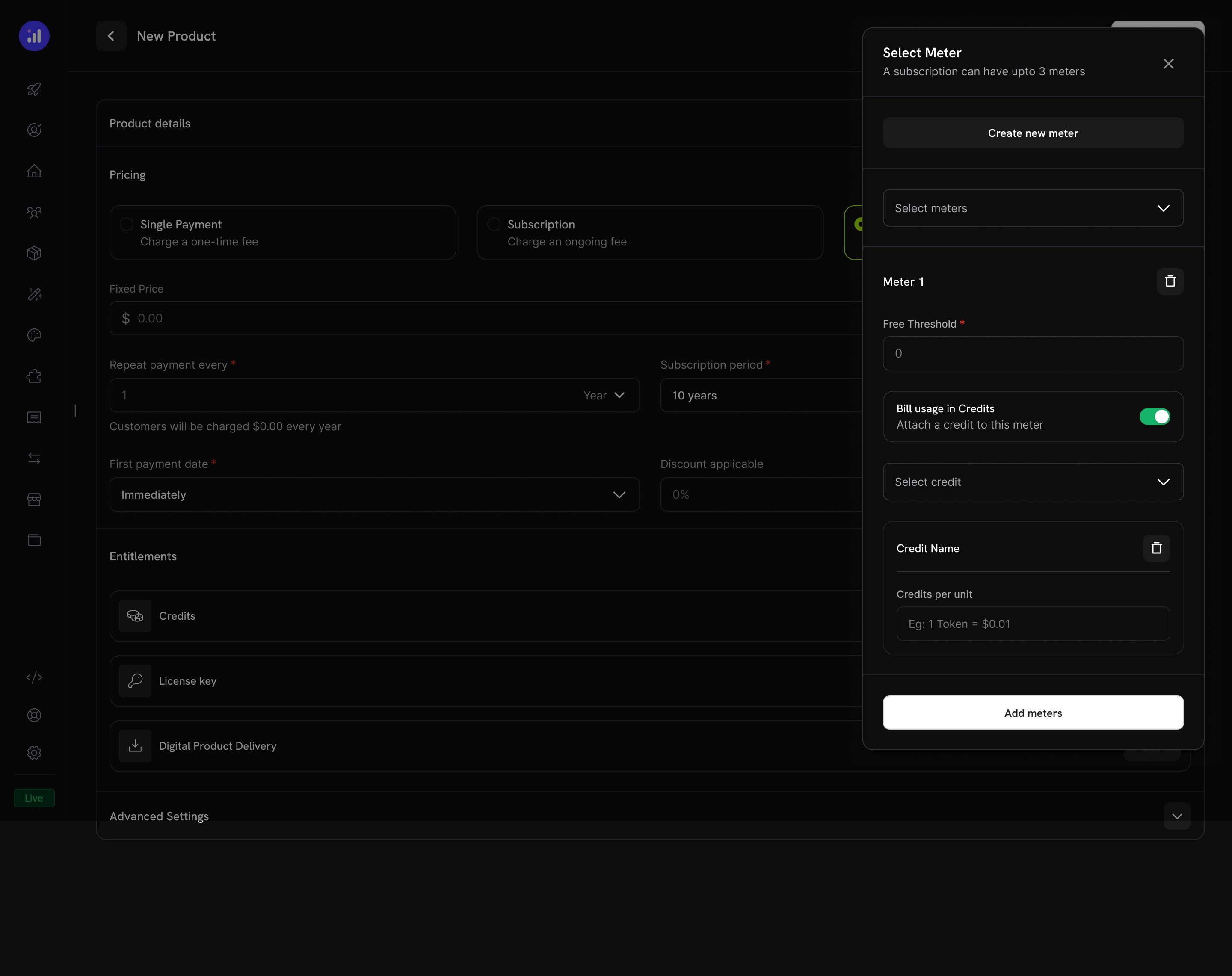
Credit attached to a meter with per-unit conversion rate.
Configure Credit Issuance
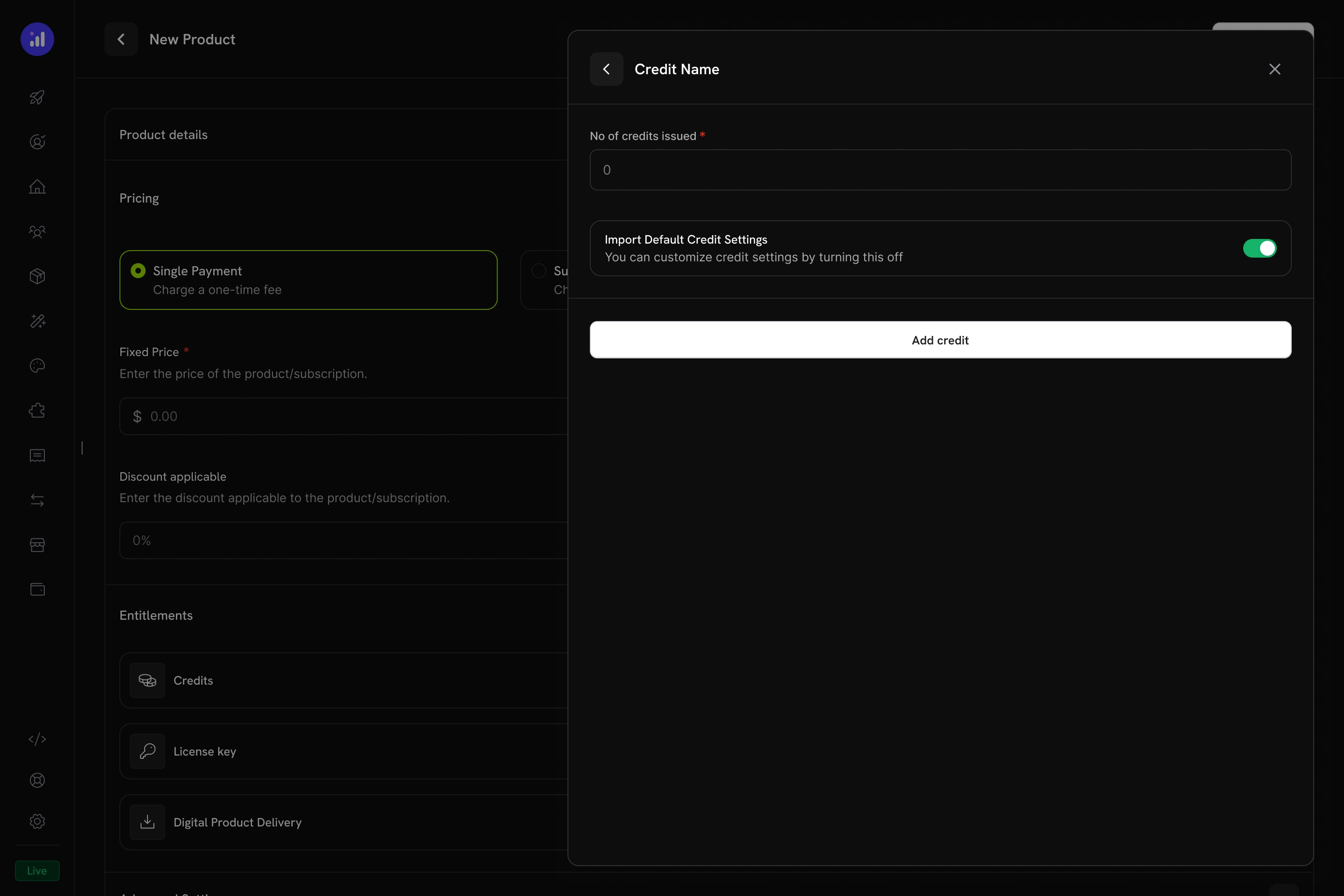
Configure how many credits to issue and whether to use default settings.
Verify Attachment
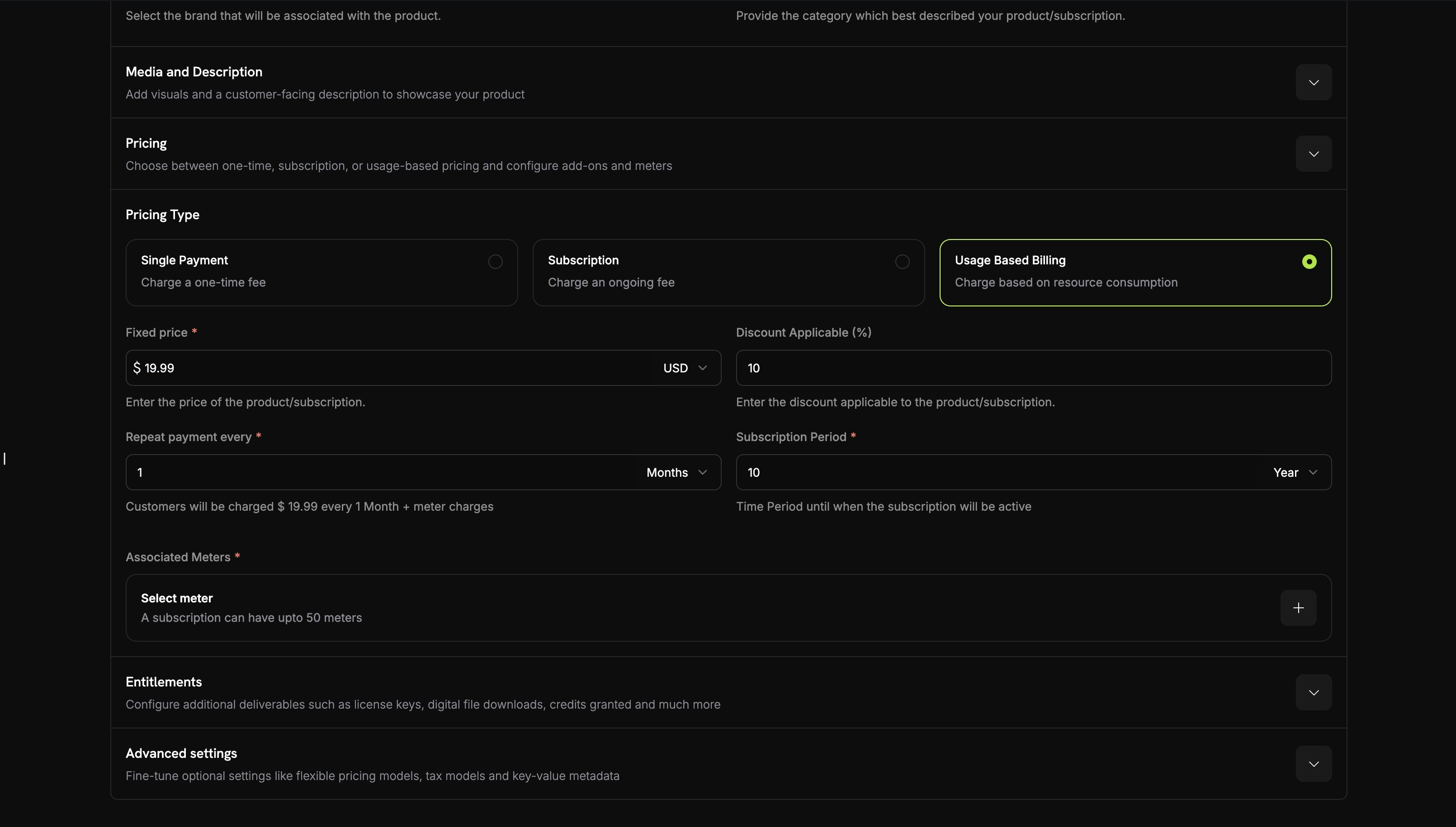
Meter with credit attached showing price, threshold, and credit name.
Credit Settings
Rollover
Rollover lets unused credits carry forward to the next billing cycle instead of expiring.Overage
Overage controls what happens when a customer’s credit balance reaches zero mid-cycle.Kedaluwarsa
credit_expired. Jika rollover diaktifkan, persentase rollover diterapkan sebelum kedaluwarsa, dan hanya sisanya yang kedaluwarsa.Usage Billing dengan Kredit
Ketika kredit ditautkan ke usage meters, sistem membuat model billing berbasis konsumsi yang canggih. Pelanggan menerima alokasi kredit, dan usage events secara otomatis mengurangi saldo mereka.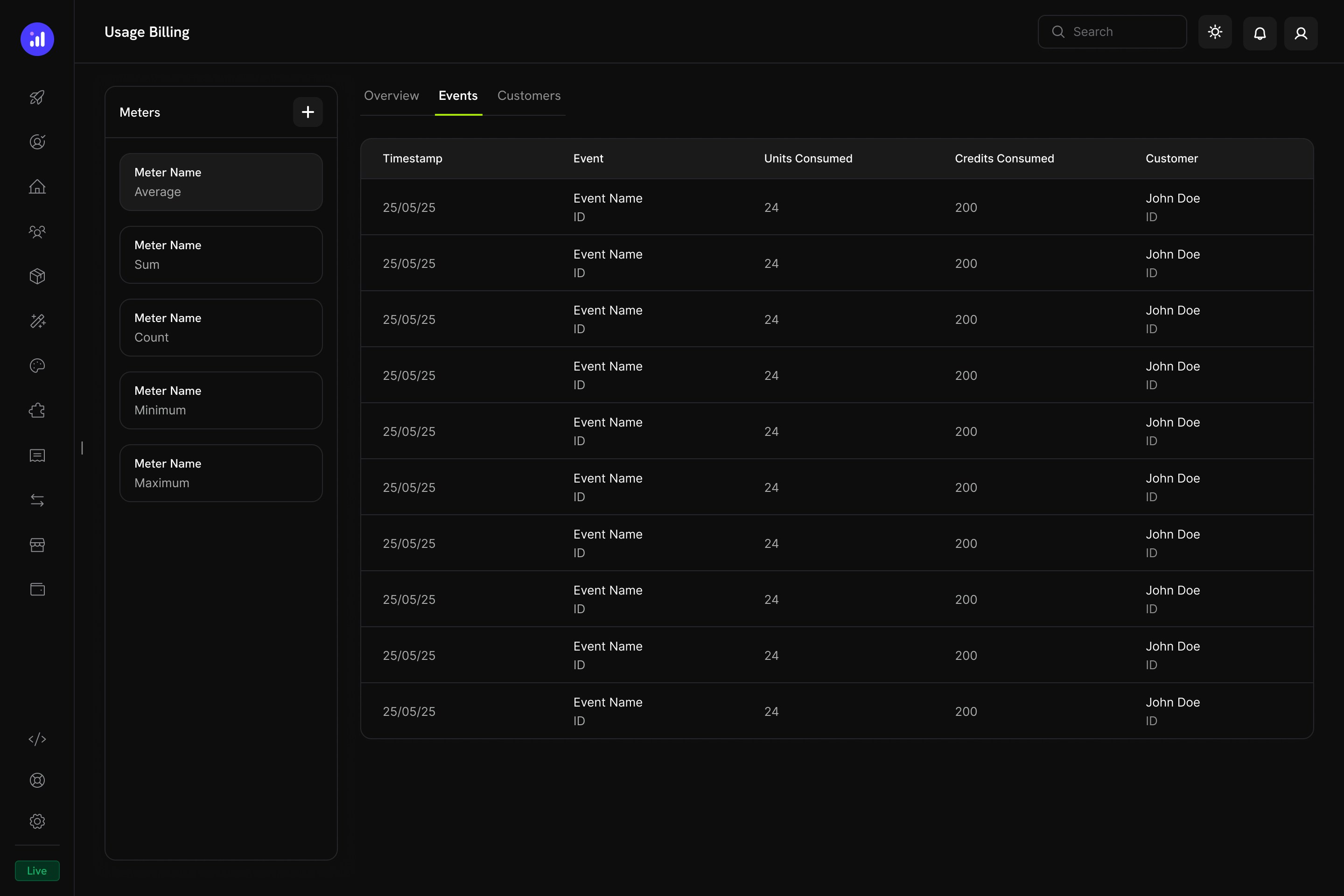
The Usage Billing dashboard shows meter events with units consumed, credits consumed, and customer details.
Cara Kerja Pengurangan Kredit Berbasis Meter
- Aplikasi Anda mengirim usage events: Setiap event mencakup customer ID, nama event, dan metadata
- Meter mengagregasikan event: Menggunakan agregasi Count, Sum, Max, atau Last
- Kredit dikurangi secara otomatis: Background worker memproses event setiap menit, mengonversi unit meter menjadi kredit menggunakan rate yang dikonfigurasi, lalu mengurangi saldo pelanggan dengan urutan FIFO (grant yang paling cepat kedaluwarsa terlebih dahulu)
- Overage dilacak: Jika saldo kredit mencapai nol dan overage diaktifkan, sistem melacak penggunaan overage untuk billing pada akhir cycle
Panel Meters
Dashboard Usage Billing menyertakan panel Meters yang mencantumkan semua meter yang ditentukan beserta jenis agregasinya:Pengalaman Pelanggan
Checkout
Ketika pelanggan membeli produk dengan kredit terlampir, halaman checkout menampilkan kredit yang disertakan sebagai bagian dari penawaran produk.Checkout shows included credits with the product, making the value proposition clear.
Customer Portal
Pelanggan dapat melihat dan mengelola saldo kredit mereka di Customer Portal pada bagian Credits.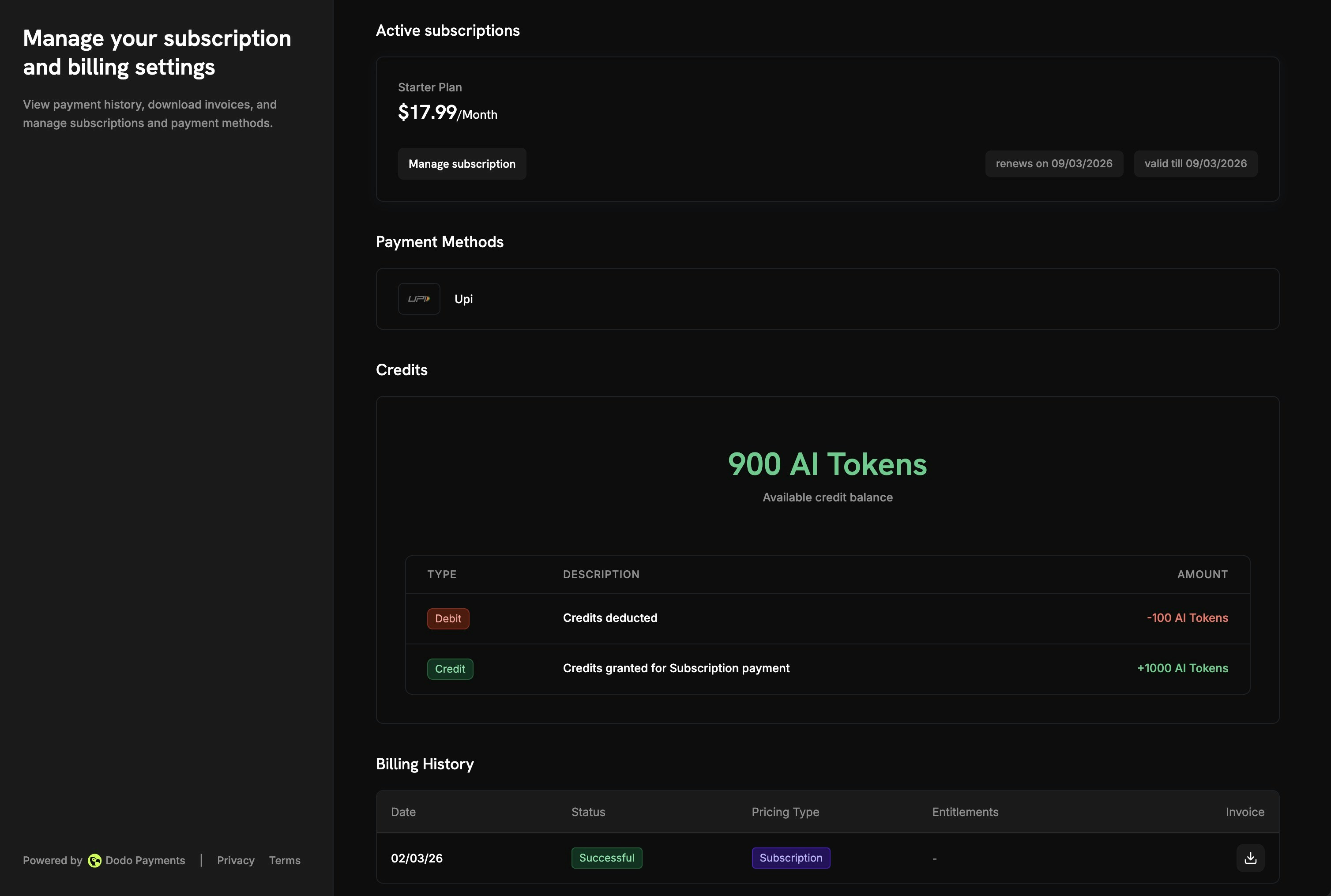
The Customer Portal shows available balance and full transaction history.
- Available Balance: Saldo kredit saat ini yang ditampilkan secara jelas
- Credit Tabs: Beralih di antara berbagai jenis kredit (misalnya, “OpenAI Credits” atau “Usage Tokens”)
- Recent Transactions: Riwayat lengkap yang mencakup tanggal, ID transaksi, jenis, jumlah, dan saldo berjalan
Detail Subscription
Halaman detail subscription menampilkan credit entitlements bersama informasi plan lainnya.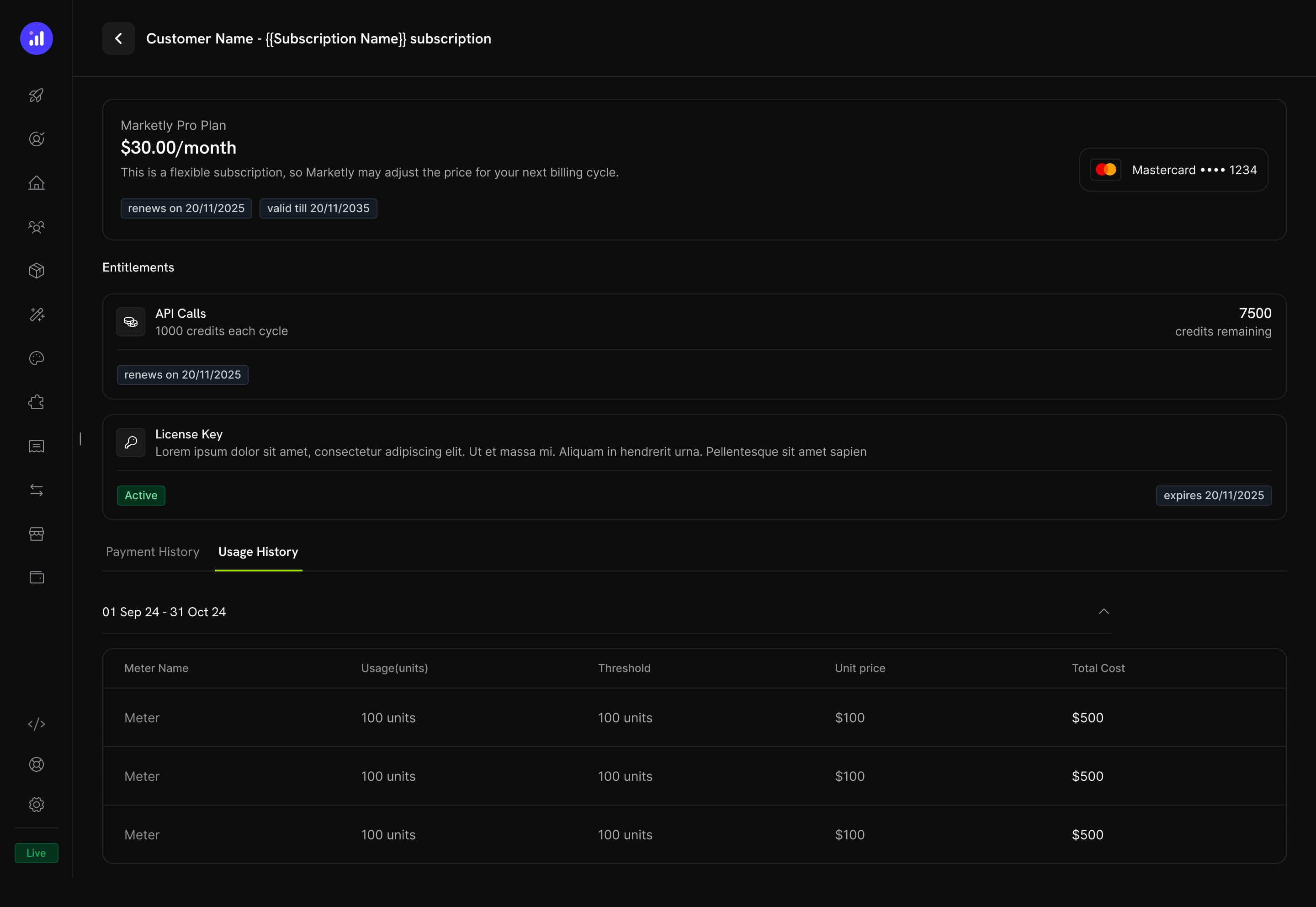
Subscription details show credit allocation, remaining balance, and renewal date.
- Credit allocation per billing cycle (misalnya, “1000 credits each cycle”)
- Remaining balance (misalnya, “7500 credits remaining”)
- Renewal date untuk penerbitan kredit berikutnya
- Tab Usage History dengan rincian tingkat meter yang menampilkan unit yang digunakan, threshold, harga per unit, dan total biaya
Detail Transaksi
Halaman transaksi pembayaran menyertakan bagian Entitlements yang menampilkan semua entitlement yang diberikan bersama pembayaran, termasuk kredit.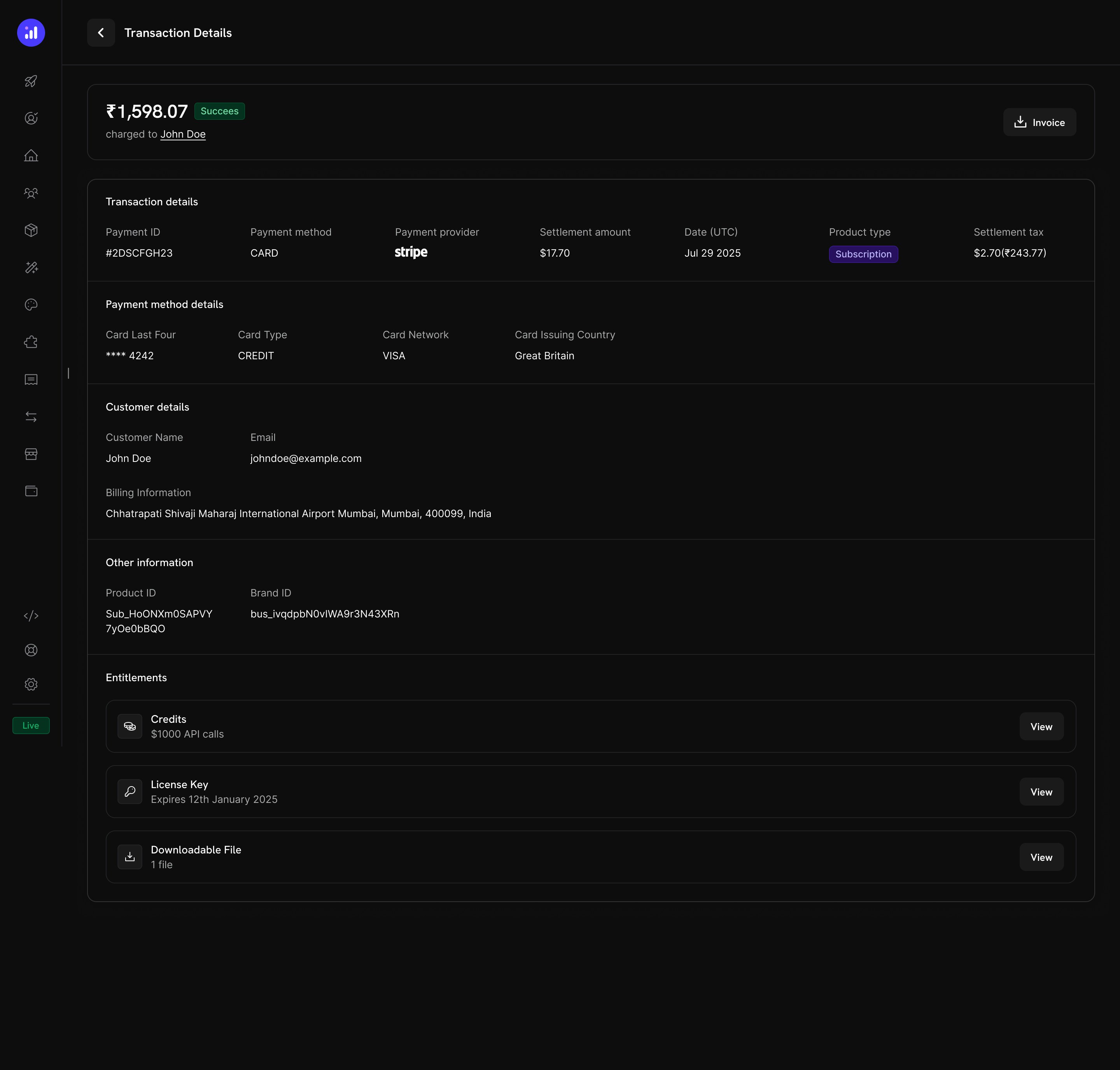
Transaction details show credits alongside other entitlements like license keys and digital downloads.
Mengelola Kredit
Tampilan Dashboard
Daftar Credit Entitlements
Lihat semua credit entitlements Anda di Products → Credits. Tabel menampilkan nama kredit dan pengaturan kedaluwarsa, serta menyediakan tindakan cepat untuk mengedit atau mengarsipkan.Credits listing with total count, creation button, and management actions.
Detail Kredit Pelanggan
Lihat saldo kredit dan riwayat transaksi pelanggan tertentu dari Customers → [Customer Name] → Credits.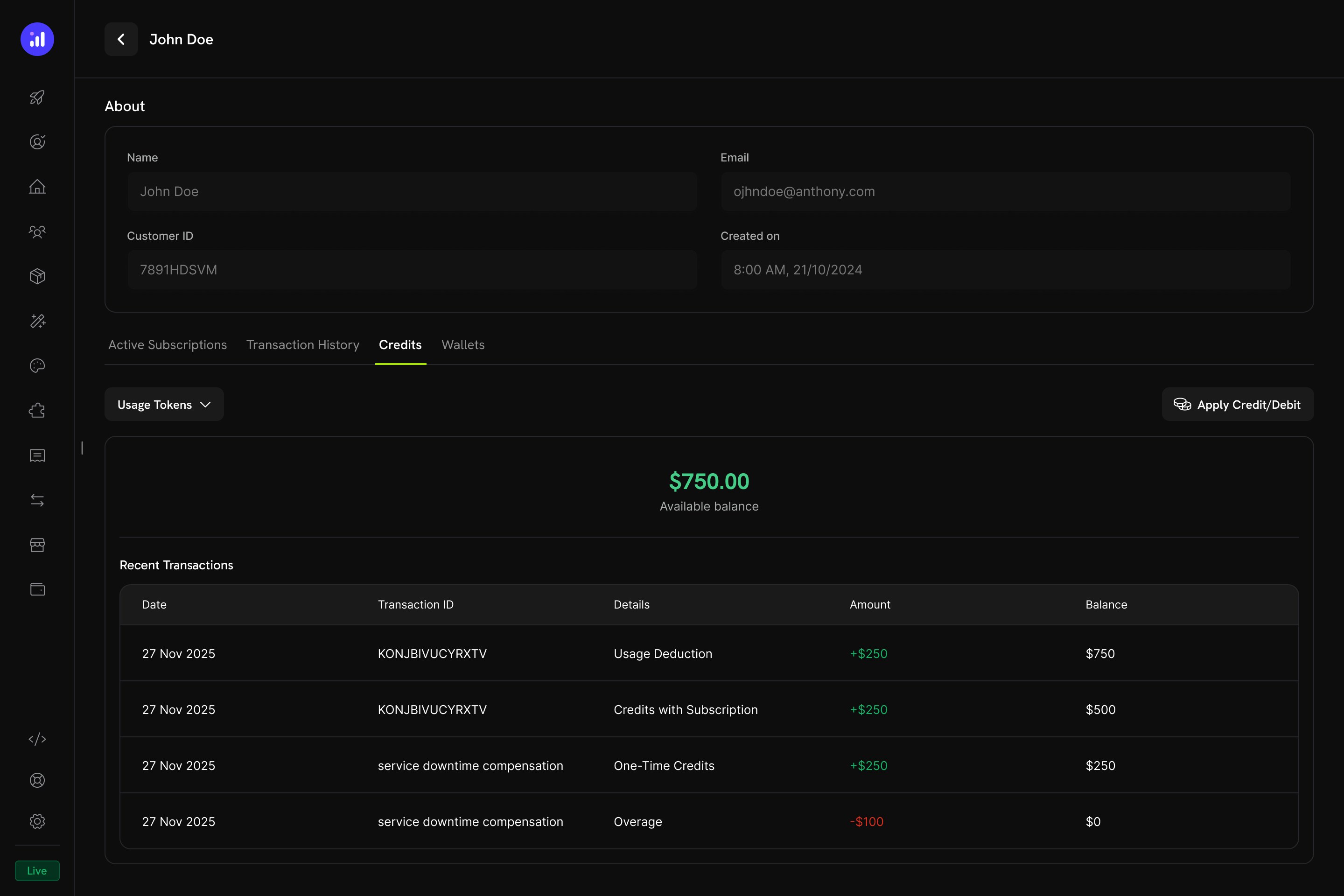
Customer detail page showing credit balance and full transaction ledger.
- Credit Selector - Beralih di antara berbagai credit entitlements
- Available Balance - Saldo saat ini dalam tampilan besar dan jelas
- Apply Credit/Debit - Tombol untuk menyesuaikan saldo pelanggan secara manual
- Recent Transactions - Ledger lengkap dengan tanggal, ID transaksi, jenis, jumlah, dan saldo berjalan
Penyesuaian Manual
Anda dapat menambahkan atau mengurangi saldo pelanggan secara manual langsung dari dashboard:Navigate to Customer
Open Credits Tab
Apply Credit or Debit
Confirm
manual_adjustment dengan audit trail lengkap.Credit Ledger
Setiap operasi kredit dicatat dalam credit ledger, sehingga menyediakan audit trail lengkap:Webhooks
Credit-Based Billing memicu webhook events untuk setiap perubahan dalam siklus hidup kredit. Gunakan event ini untuk menjaga sinkronisasi aplikasi dengan saldo kredit, memicu notifikasi, atau membuat billing workflows khusus.credit.* kecuali credit.balance_low) menyertakan payload CreditLedgerEntry lengkap dengan saldo sebelum/sesudah, overage sebelum/sesudah, referensi sumber, dan metadata dari subscription atau payment sumber grant (kosong untuk grant yang dibuat langsung melalui API). Event credit.balance_low menyertakan konfigurasi threshold dan saldo saat ini.
Credit Webhook Payloads
Manajemen API
Create Credit Entitlements
Create Credit Entitlements
Create Credit Entitlement
List Credit Entitlements
Manage Credit Entitlements
Manage Credit Entitlements
Get Credit Entitlement
Update Credit Entitlement
Delete Credit Entitlement
Undelete Credit Entitlement
Grant and Adjust Credits
Grant and Adjust Credits
Create Ledger Entry
Query Balances and Ledger
Query Balances and Ledger
List Balances
Get Customer Balance
List Customer Grants
List Customer Ledger
Contoh Integrasi
Inisialisasi client Dodo Payments:Contoh Dunia Nyata
AI SaaS Platform
AI SaaS Platform
- Credit Type: Custom Unit (“AI Tokens”)
- Precision: 0 (token utuh)
- Rollover: maksimum 25%, timeframe 1 bulan
- Overage: Diaktifkan, bill overage at billing
- Meter:
ai.generationdengan agregasi Sum pada fieldtokens
API Gateway
API Gateway
- Credit Type: Custom Unit (“API Calls”)
- Precision: 0 (panggilan utuh)
- Rollover: Dinonaktifkan
- Overage: Plan Developer+ mengizinkan overage (forgive at reset), plan Free menonaktifkan overage
- Meter:
api.requestdengan agregasi Count
Cloud Storage Service
Cloud Storage Service
- Jenis Kredit: Unit Kustom (“GB-hours”)
- Presisi: 2 (dua angka desimal)
- Rollover: maksimal 50%, dibawa ke periode berikutnya satu kali
- Overage: Diaktifkan, dengan batas overage yang ditetapkan dalam GB-hours
- Meter:
storage.usagedengan agregasi Sum
Praktik Terbaik
- Mulai dengan sederhana: Mulai dengan satu jenis kredit tanpa rollover. Tambahkan kompleksitas berdasarkan feedback pelanggan dan pola penggunaan.
- Tetapkan ekspektasi yang jelas: Tampilkan alokasi kredit, saldo tersisa, dan harga overage secara jelas di halaman produk dan Customer Portal.
- Gunakan unit yang bermakna: Beri nama kredit berdasarkan hal yang direpresentasikannya (misalnya, “API Calls” atau “AI Tokens”), bukan istilah umum. Ini membantu pelanggan memahami nilainya.
- Konfigurasikan kedaluwarsa dengan bijak: Jendela kedaluwarsa singkat (7 hari) mendorong urgensi tetapi dapat membuat pelanggan frustrasi. Jendela yang lebih panjang (30–90 hari) lebih ramah pelanggan untuk sebagian besar produk SaaS.
- Pantau saldo rendah: Tetapkan threshold saldo rendah untuk memberi tahu pelanggan sebelum kredit mereka habis, sehingga mengurangi biaya overage yang tidak terduga.
- Uji dalam test mode: Buat kredit, lampirkan ke produk pengujian, dan simulasikan seluruh siklus pembelian → penggunaan → pengurangan → kedaluwarsa sebelum meluncurkannya.